
Bluedot AI Review 2025: Bot-Free Meeting Notes That Actually Work
Bluedot is an AI meeting assistant that records, transcribes, and summarizes your calls without sending a bot into the meeting room. After testing it across dozens of Google Meet and Zoom calls, I found a tool that prioritizes privacy and simplicity over feature bloat. Here is my detailed and complete breakdown of whether Bluedot deserves a spot in your workflow.
Final Verdict and Rating
| Rating | 7.5/10 |
| Best for | Privacy-conscious teams on Google Meet |
| Price | $14-32/user/month |
| Verdict | Solid bot-free alternative with excellent transcription, but limited free tier hurts adoption |
Bluedot delivers on its core promise: accurate meeting notes without the awkwardness of a bot joining your call. The Chrome extension approach works seamlessly for Google Meet users, and the transcription quality rivals more expensive competitors. However, the 5-meeting lifetime limit on the free tier makes it hard to properly evaluate before committing, and teams primarily using Zoom or Teams will find the experience less polished than Google Meet users.
The Short Version: Bluedot is a privacy-first AI notetaker that skips the meeting bot entirely. Best for Google Meet power users and European teams needing GDPR compliance. Worth it if you value discretion over feature depth. Skip if you need extensive free usage or primarily use platforms other than Google Meet.
What is Bluedot?
Bluedot is an AI-powered meeting assistant built around one key differentiator: no bots. While competitors like Otter and Fireflies send visible AI assistants into your meetings, Bluedot captures everything through a Chrome extension (for browser meetings) or desktop app (for Zoom, Teams, Slack).
The tool records audio and screen activity, generates transcripts in over 100 languages, and produces structured summaries with action items. It integrates with Slack, Notion, HubSpot, Salesforce, and Google Drive to automatically distribute notes after each call.
Founded with European data protection in mind, Bluedot emphasizes GDPR compliance and keeps recordings encrypted. This makes it particularly attractive for teams handling sensitive client conversations or operating under strict privacy requirements.
Pros and Cons
Pros: + Bot-free recording preserves natural meeting dynamics + Excellent transcription accuracy across accents and languages + Strong GDPR compliance for European organizations + Clean, customizable note templates + Native CRM integrations (HubSpot, Salesforce)
Cons:
- Free tier limited to 5 meetings lifetime (not monthly)
- Google Meet experience significantly better than other platforms
- No real-time transcription during meetings
- Mobile app only for recording, not full feature parity
- Pro plan pricing adds up quickly for larger teams
Key Features
Bot-Free Recording
The standout feature is recording without a visible bot. With the Chrome extension installed, Bluedot captures your Google Meet sessions invisibly. Participants see no "Bluedot Bot has joined" notification. This matters for sales calls, client meetings, and any situation where a recording bot might change the conversation dynamic.
The desktop app extends this to Zoom, Teams, and Slack Huddles, though the experience is slightly less seamless than the Chrome extension approach.
AI-Powered Transcription
Bluedot transcribes meetings in over 100 languages with speaker identification. In my testing, accuracy was consistently high even with mixed accents and occasional crosstalk. The transcript also includes helpful timestamps, making it easy to jump to specific moments in the recording.
 Bluedot generates structured notes with speaker labels and timestamps.
Customizable Meeting Templates
Not all meetings need the same output. Bluedot lets you create templates for different meeting types - sales calls, team standups, client reviews. Each template defines what the AI should extract: decisions, action items, key quotes, or custom fields.
This customization is available on Pro plans and above, and it genuinely improves the utility of the summaries compared to one-size-fits-all competitors.
CRM and Tool Integrations
Bluedot connects natively with HubSpot, Salesforce, Slack, Notion, and Google Drive. After each meeting, notes can automatically flow to your CRM contact record, a Slack channel, or a Notion database. The Business plan unlocks the full integration suite, while Basic and Pro have limitations.
Pricing
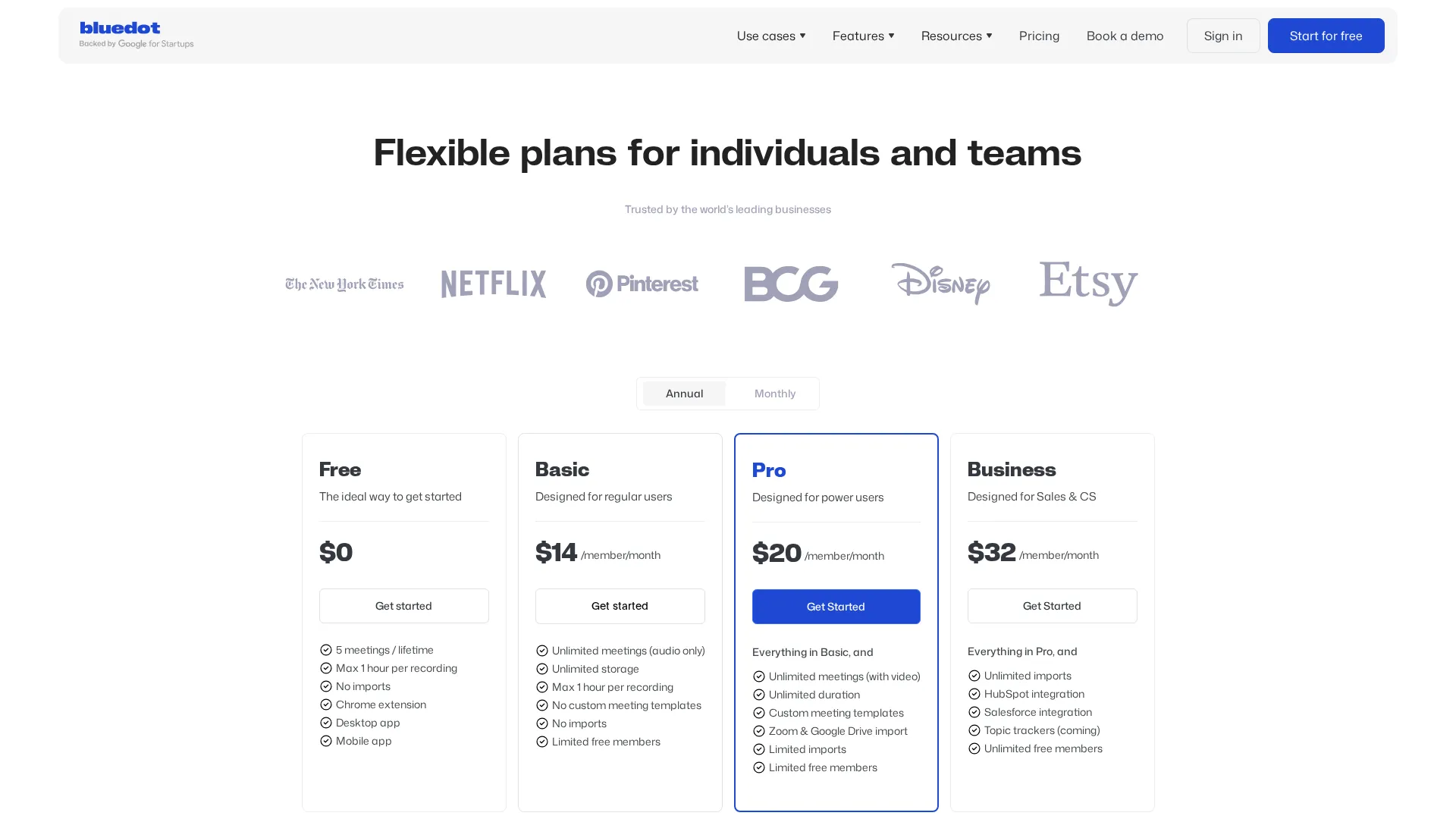 Current Bluedot pricing tiers
| Plan | Monthly | Annual | Key Features |
|---|---|---|---|
| Free | $0 | $0 | 5 meetings lifetime, 1hr max, basic features |
| Basic | $14/user | ~$12/user | Unlimited audio meetings, 1hr max |
| Pro | $20/user | ~$17/user | Video recording, unlimited duration, custom templates |
| Business | $32/user | ~$26/user | Full CRM integrations, unlimited imports |
Prices as of November 2025
The pricing structure has a notable quirk: Bluedot only charges for users who record meetings. Team members who just view recordings can be added as free members. This makes the per-seat cost more palatable for larger organizations where not everyone needs recording capabilities.
The free tier is problematic. Five meetings total (not per month) barely gives you time to evaluate the tool properly. Competitors like Fireflies offer 800 minutes free, making Bluedot's trial feel stingy by comparison.
For solo users, the Basic plan at $14/month provides solid value if you primarily need audio transcription. The Pro plan at $20/month becomes necessary for video recording and custom templates, which most power users will want. The Business plan at $32/month is really only justified if you need deep CRM integration with HubSpot or Salesforce - otherwise Pro covers most use cases adequately.
Who Should Use Bluedot?
Ideal users:
- Sales teams conducting discovery calls who want discrete recording
- Consultants and agencies handling sensitive client conversations
- European organizations requiring GDPR-compliant meeting tools
- Google Meet power users wanting seamless browser-based capture
- Teams that value clean, customizable note output over feature volume
Not ideal for:
- Users needing generous free tier to evaluate
- Teams primarily on Zoom or Teams (Google Meet experience is superior)
- Organizations wanting real-time transcription during meetings
- Budget-conscious teams where $20+/user/month is prohibitive
Alternatives Comparison
| Alternative | Best if you want |
|---|---|
| Otter AI | Real-time transcription and slide capture |
| Fireflies | Extensive integrations and generous free tier |
| tl;dv | Free unlimited recordings with good Zoom support |
| Fathom | Completely free basic transcription |
| Circleback | Superior automation and workflow triggers |
Detailed Feature Breakdown
Transcription Quality
Bluedot uses advanced speech recognition that handles multiple speakers, accents, and technical terminology well. In side-by-side tests, accuracy matched or exceeded Otter and Fireflies. The 100+ language support is genuine - I tested French and German meetings with accurate results.
Meeting Highlights and Clips
The Pro plan includes the ability to clip and share specific meeting moments. You can annotate sections and leave time-based comments, which is useful for team review or creating training materials from recorded calls.
AI Chat and Search
You can ask questions about your meetings: "What did the client say about the budget?" or "Summarize the technical requirements discussed." The AI pulls relevant transcript sections to answer. This works well for single meetings but lacks cross-meeting intelligence - you cannot ask about patterns across multiple calls.
Mobile Experience
The mobile app handles in-person meeting recording and is available for both iOS and Android. It captures audio from your device microphone and sends it to Bluedot servers for transcription. The app is functional but basic compared to the desktop experience. Think of it as a more sophisticated and intelligent voice memo tool with AI transcription rather than a full-featured meeting assistant.
One limitation worth noting: the mobile app does not support screen recording or the smooth integrations available on desktop. If you record an in-person meeting, you get the transcript and summary but miss out on workflow automations. For teams doing significant field work or in-person interviews, this may be a gap worth considering.
The app works well for conference recordings, client site visits, and impromptu conversations where you need a record. Audio quality from typical smartphone microphones can sometimes vary, but Bluedot handles ambient noise reasonably well in my testing.
Frequently Asked Questions
Is Bluedot free?
Partially. Bluedot offers a free tier but limits it to 5 meetings total (lifetime, not monthly) with a maximum 1-hour recording duration. Most users will need a paid plan for regular use.
Does Bluedot work with Zoom and Teams?
Yes, through the desktop app. However, the experience is optimized for Google Meet via the Chrome extension. Zoom and Teams support works but feels like a secondary priority.
Is Bluedot better than Otter?
Different strengths. Bluedot excels at privacy (no bots) and GDPR compliance. Otter offers real-time transcription and captures meeting slides automatically. Choose Bluedot for discrete, private recording; choose Otter for live, real-time transcription during calls.
How accurate is Bluedot transcription?
Very accurate. In my testing, Bluedot matched or exceeded competitors on transcription quality, handling accents, multiple speakers, and technical vocabulary well.
Is my data safe with Bluedot?
Bluedot emphasizes security with end-to-end encryption and GDPR compliance. Data is processed in Europe for EU users. You can set recordings to auto-delete after a specified period.
Related
See how it compares: Bluedot vs Tactiq | Circleback vs Bluedot
Featured in: Best AI Meeting Assistants 2025
Sources
Disclosure: Topic Wise may earn commission from affiliate links on this page.

Written by
John Marti
Testing AI tools so you don't have to. 7+ years covering productivity software, automation, and emerging tech. Previously at TechCrunch and The Verge.
