
Granola vs Jamie 2025: Bot-Free Meeting Notes Face Off
Granola and Jamie share a defining characteristic: neither sends a bot into your meetings. Both tools capture audio locally from your device, transcribe conversations, and generate AI summaries without alerting other participants to their presence. This bot-free approach solves the social friction that plagues tools like Otter or Fireflies where visible recording bots change meeting dynamics.
But these two privacy-focused tools serve different users in different ways. Granola emerged from Silicon Valley and raised $67 million to build a notepad-style experience favored by VCs and founders. Jamie comes from Europe with strict GDPR compliance and a more traditional meeting assistant approach. This comparison breaks down where each tool wins and loses across the categories that actually matter.
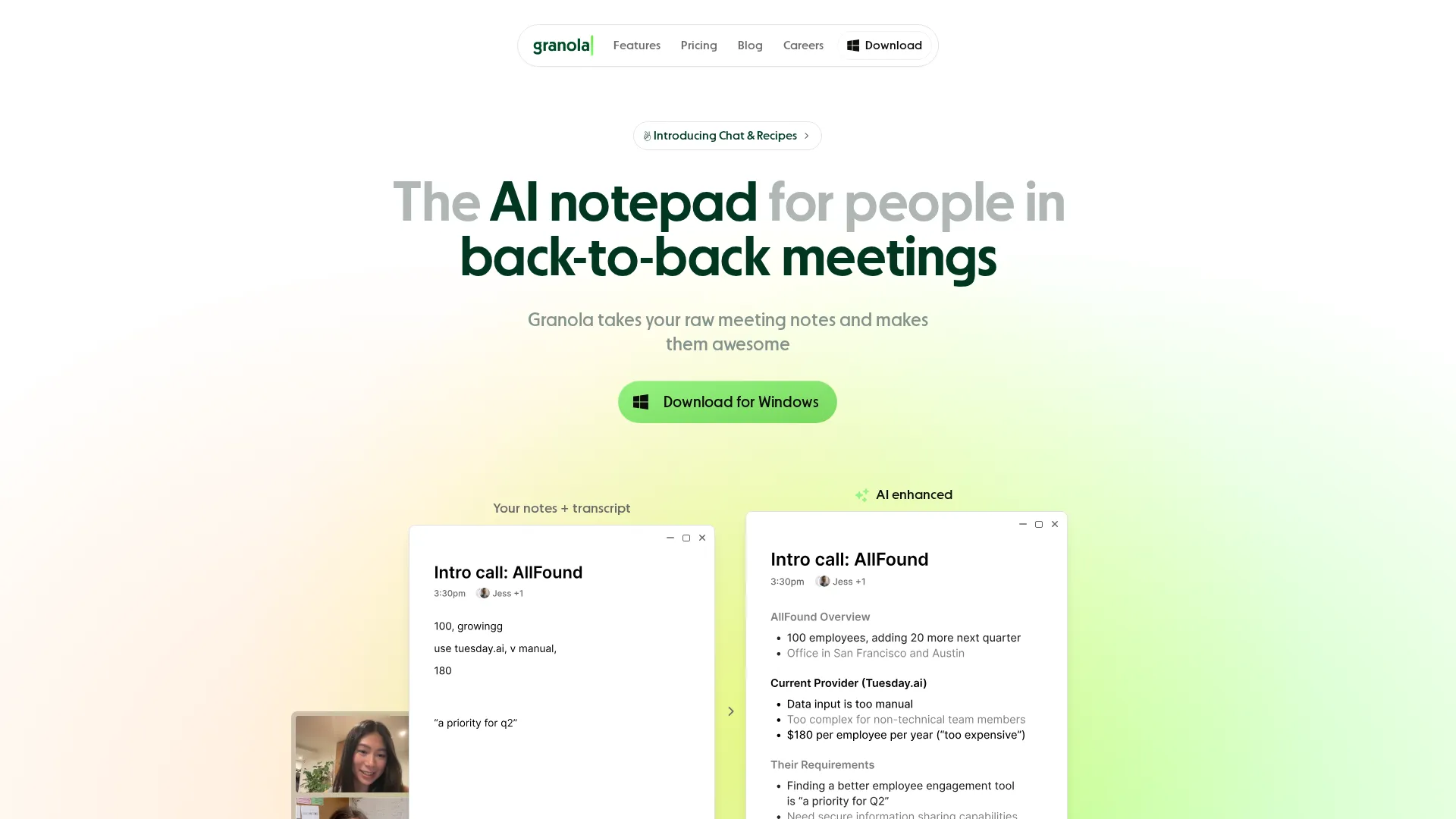 Granola homepage
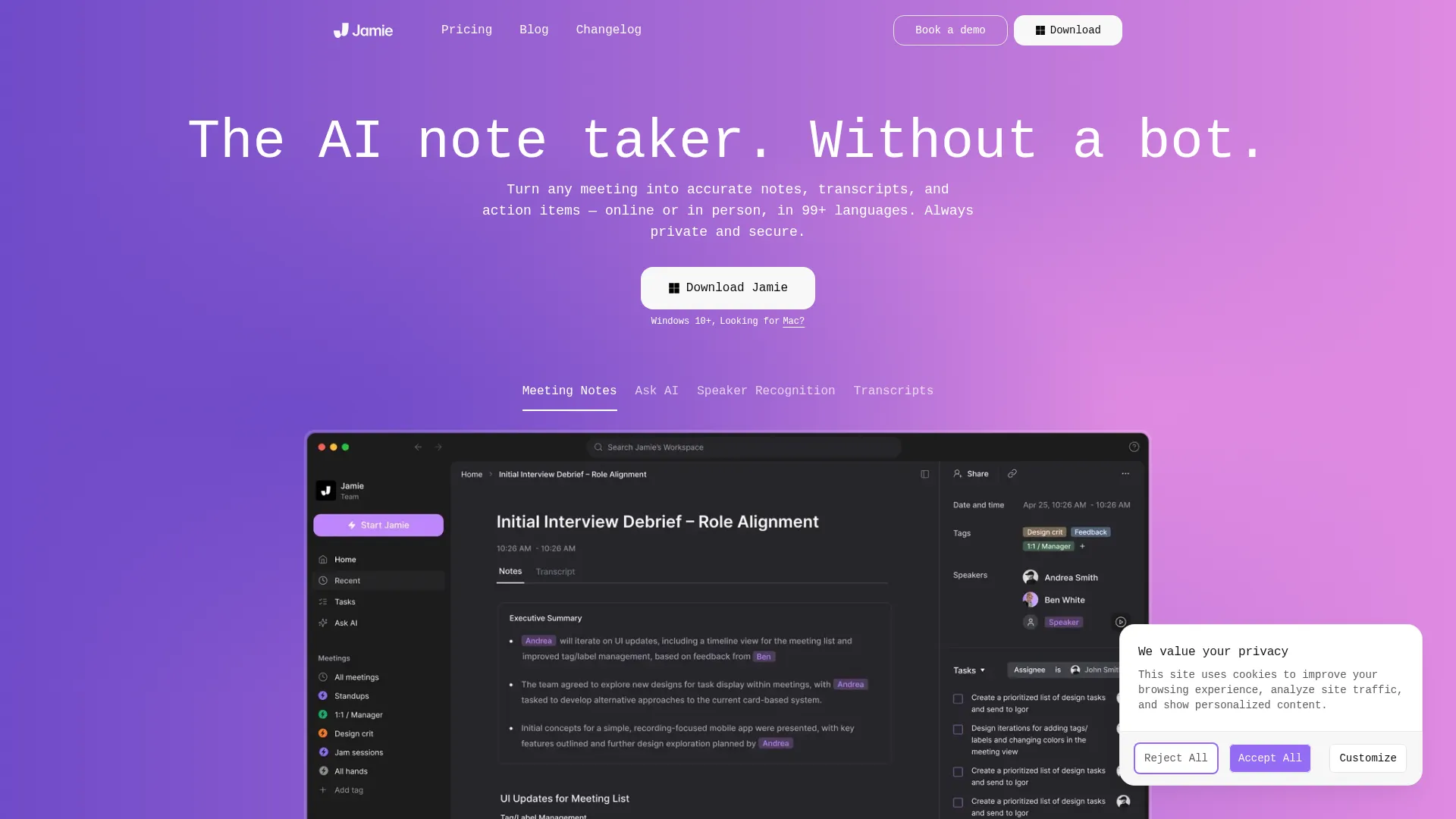 Jamie homepage
Quick Answer
Choose Granola if:
- You want a clean notepad experience with AI enhancement
- You prefer one-time pricing with unlimited meetings
- Mac is your primary platform
- You value VC-backed Silicon Valley pedigree
Choose Jamie if:
- You need 99+ language support
- GDPR compliance is non-negotiable
- You prefer meeting-based limits over subscription complexity
- Windows parity matters to your workflow
Our pick: Granola for most individual users due to better value at the Business tier. Jamie wins for European teams and multilingual organizations.
---
Overview Table
| | Granola | Jamie | |---|---------|-------| | Best for | Individuals, startups | European teams, regulated industries | | Price | Free / $14 / $35 | Free / €25 / €47 | | Free tier | 25 meetings total | 10 meetings/month | | Strength | Notepad + AI enhancement | 99+ languages, GDPR | | Weakness | Limited integrations | Per-meeting pricing |
---
Round 1: Bot-Free Implementation
| | Granola | Jamie | |---|---------|-------| | How it works | Desktop app captures audio | Desktop app captures audio | | Platforms | Mac (polished), Windows (beta) | Mac, Windows (parity) | | Mobile | iOS app available | iOS app available | | Detection risk | Extremely low | Extremely low |
Both tools implement bot-free recording identically at the core level: a desktop application captures your microphone and system audio, transcribes locally, and sends text (not audio) for processing. Neither tool joins meetings as a participant. Neither creates recordings that could be discovered by IT departments scanning for unauthorized recording software.
The difference appears in platform support. Granola treats Mac as the primary platform with Windows still catching up. Users report Windows-specific bugs, missing features, and performance issues that Mac users never encounter. Jamie maintains closer parity between platforms, giving Windows users equivalent functionality.
For in-person meetings, both offer mobile apps that handle local recording and transcription. The experience is comparable - point your phone at the meeting, and both apps capture and transcribe adequately.
Winner: Jamie for platform parity. Windows users should not accept second-class treatment.
---
Round 2: Transcription and Language Support
| | Granola | Jamie | |---|---------|-------| | Accuracy | 90-95% on clear audio | 90-95% on clear audio | | Languages | 6+ | 99+ | | Speaker ID | Limited (iOS only reliable) | Yes, with memory | | Real-time | No (post-meeting) | No (post-meeting) |
Transcription accuracy is essentially identical between the two tools. Both achieve 90-95% accuracy on clear audio with native English speakers. Both struggle with heavy accents, technical jargon, and overlapping speakers. Neither offers a meaningful accuracy advantage over the other in standard business English.
The language gap is significant. Granola supports six languages: English, French, German, Spanish, Italian, and Dutch. Jamie claims support for 99+ languages. For multilingual teams or organizations operating across regions, this difference matters enormously. A consulting firm working with Asian clients needs Jamie; Granola simply cannot serve that use case.
Speaker identification presents another contrast. Jamie implements speaker recognition with memory - it learns who is who across meetings and labels speakers accordingly. Granola's speaker identification is unreliable on desktop and only works properly through the iOS app for in-person meetings.
Neither tool offers real-time transcription during meetings. Both process audio after the call ends, typically delivering results within 5-10 minutes.
Winner: Jamie decisively. The 99 vs 6 language comparison is not close.
---
Round 3: AI Features and Note Enhancement
| | Granola | Jamie | |---|---------|-------| | Summary style | Notepad enhancement | Traditional summary | | Custom templates | Yes, extensive | Yes, basic | | Cross-meeting search | Yes (Ask Granola) | Yes | | AI assistant | Chat interface | Chat interface | | Action items | Extracted automatically | Extracted automatically |
Granola's differentiating feature is the notepad approach. You take rough notes during meetings, then click "Enhance Notes" to have AI expand your bullets into full documentation. This hybrid model produces better results than pure AI summarization because your notes provide context that guides the AI.
Jamie takes the traditional approach: it generates summaries and action items entirely from the transcript. The results are competent but generic. You get a standard meeting summary without the personalized context that Granola's notepad method provides.
Template customization favors Granola. The platform offers 8+ built-in templates with extensive customization options. You can build templates for sales calls, user interviews, standups, and other meeting types with specific extraction criteria. Jamie offers templates but with less granular control.
Both platforms support cross-meeting search with AI chat interfaces. You can ask questions like "What did we decide about pricing?" and get answers from any past meeting. The implementations are comparable in usefulness.
Winner: Granola for the innovative notepad approach and deeper template customization.
---
Round 4: Integrations and Workflow
| | Granola | Jamie | |---|---------|-------| | CRM | HubSpot only | HubSpot | | Productivity | Notion, Slack | Notion, Google Docs, OneNote | | Calendar | Google Workspace only | Google, Outlook (via workaround) | | Zapier | Business tier only | Not available | | API | Yes | Limited |
Both tools have limited integration ecosystems compared to competitors like Fireflies or Otter. Neither connects to Salesforce, which matters significantly for enterprise sales teams. Neither offers deep automation capabilities out of the box.
Granola integrates with HubSpot for CRM, plus Notion and Slack for productivity. The calendar limitation is significant: you must use a Google Workspace account. Personal Gmail and Outlook calendars are not supported for account creation, limiting accessibility for freelancers and consultants using personal email.
Jamie integrates with similar tools: HubSpot, Notion, Google Docs, and OneNote. The OneNote integration gives Jamie an edge for Microsoft-centric organizations. Calendar support is also Google-focused but less restrictive on account types.
Neither tool supports Zapier effectively at accessible price points, limiting custom automation possibilities. Both offer APIs but neither is well-documented or widely used for custom integrations.
Winner: Tie - both have weak integration ecosystems. Choose based on specific needs (OneNote vs Slack).
---
Round 5: Pricing
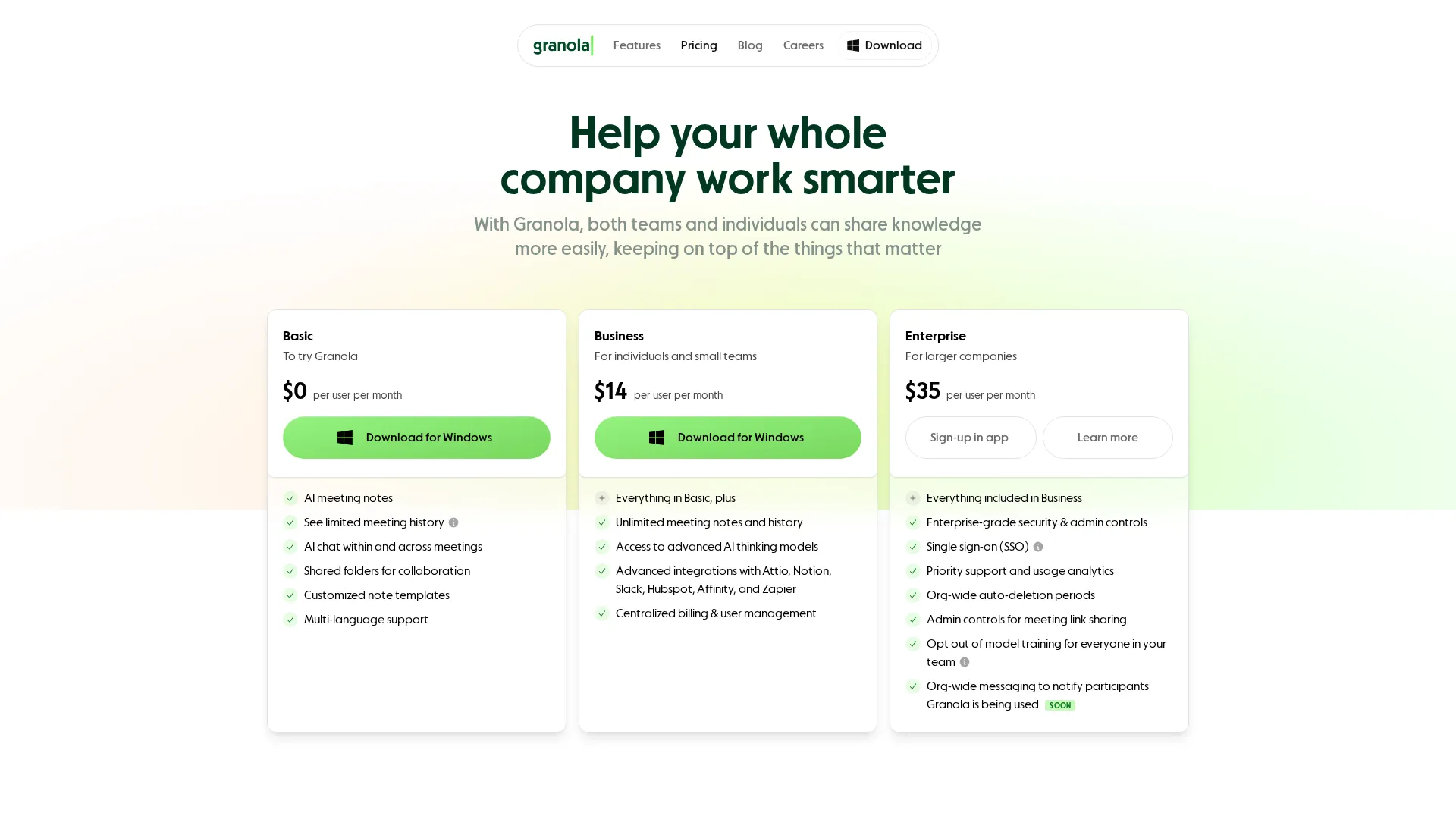 Granola pricing
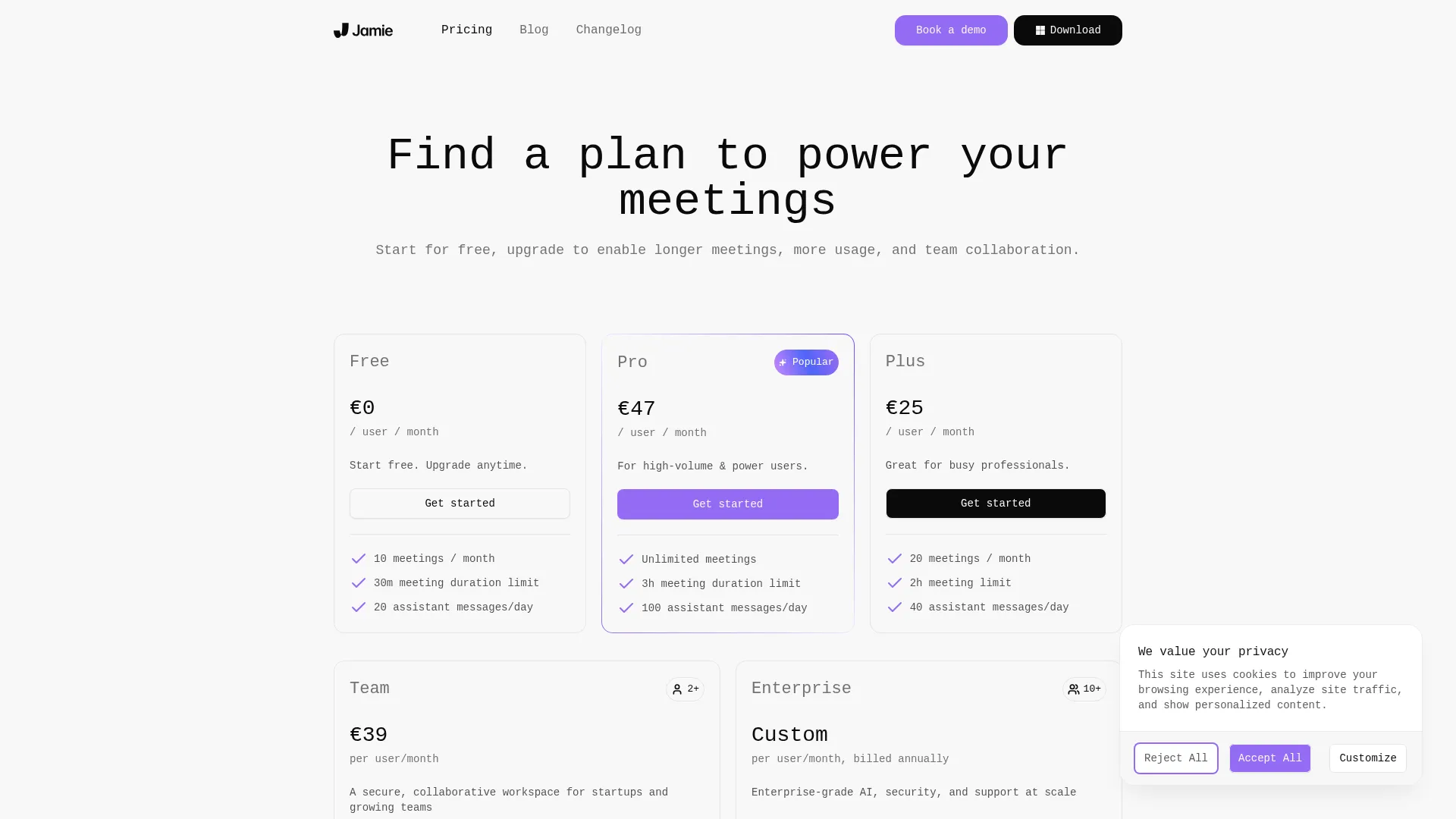 Jamie pricing (EUR)
| Plan | Granola | Jamie | |------|---------|-------| | Free | 25 meetings total | 10 meetings/month (30 min limit) | | Entry | $14/mo unlimited | €25/mo (20 meetings) | | Pro | $35/mo (Enterprise) | €47/mo (unlimited) | | Team | $14/user | €39/user |
Pricing models differ fundamentally. Granola charges a flat rate for unlimited meetings at the Business tier ($14/month). Jamie charges per meeting tier, with truly unlimited meetings only at €47/month for individuals.
For light users (under 10 meetings monthly), Jamie's free tier works indefinitely with the 30-minute meeting limit. Granola's free tier exhausts after 25 total meetings - it is a trial, not a sustainable free option.
For regular users (20+ meetings monthly), Granola's $14/month Business plan delivers better value than Jamie's €47/month Pro plan. The math is straightforward: $14 unlimited versus €47 unlimited favors Granola substantially.
Team pricing is comparable: $14/user for Granola versus €39/user for Jamie. Granola's Business tier includes team features at no additional per-user premium, while Jamie requires the explicit Team plan for collaboration capabilities.
The currency difference matters for budgeting. Granola charges in USD; Jamie charges in EUR. For US-based teams, Granola's pricing is more predictable. For European teams, Jamie's EUR pricing may align better with accounting requirements.
Winner: Granola for regular users. Jamie's per-meeting pricing becomes expensive quickly.
---
Final Score
| Category | Granola | Jamie | |----------|---------|-------| | Bot-Free Implementation | 8/10 | 9/10 | | Transcription & Languages | 6/10 | 9/10 | | AI Features | 9/10 | 7/10 | | Integrations | 5/10 | 5/10 | | Pricing | 8/10 | 6/10 | | Total | 7.2/10 | 7.2/10 |
In Brief: Two privacy-first tools with different strengths - Granola for innovation and pricing, Jamie for language support and platform parity.
The scores tie, but the categories matter differently to different users. Language support gives Jamie a decisive edge for international teams. AI enhancement gives Granola an edge for knowledge workers who want personalized documentation.
---
Decision Matrix
| Your Situation | Choose | |----------------|--------| | Solo professional, Mac | Granola | | Solo professional, Windows | Jamie | | European team | Jamie | | Multilingual meetings | Jamie | | US-based startup | Granola | | Regulated industry (legal, healthcare) | Jamie | | Budget priority | Granola Business ($14) | | Trial/evaluation | Jamie (ongoing free tier) |
---
The Verdict
Granola and Jamie both solve the meeting bot problem elegantly. The choice between them depends on your specific context more than absolute quality differences.
Choose Granola if you are a US-based individual or startup team wanting clean meeting notes with AI enhancement at a reasonable flat rate. The notepad approach produces better documentation than pure AI summarization. The $14/month unlimited plan delivers strong value. Mac users get a polished experience.
Choose Jamie if you operate internationally with multilingual meetings, require strict GDPR compliance, or work primarily on Windows. The 99+ language support is unmatched. The European hosting and privacy focus serve regulated industries well. Windows users get equal treatment.
For most English-speaking individual users, Granola's better pricing and innovative notepad feature make it the stronger choice. For teams with international scope, Jamie's language support becomes the deciding factor.
---
Frequently Asked Questions
Do Granola and Jamie record audio?
Neither tool stores audio recordings. Both capture audio locally, transcribe it, and discard the audio after processing. You get transcripts and summaries, not playable recordings.
Which has better transcription accuracy?
Accuracy is comparable at 90-95% for clear English audio. Jamie's advantage is language breadth (99+), not accuracy within any single language.
Can I use both tools simultaneously?
Technically yes, but pointless. Both capture the same audio and produce similar outputs. Choose one based on your requirements.
Which is more private?
Both emphasize privacy similarly. Jamie has explicit GDPR compliance and European hosting. Granola processes locally but stores transcripts on US servers. For strict European data residency requirements, choose Jamie.
Do either work with Microsoft Teams?
Yes, both capture audio from Teams meetings. Neither requires any integration with Teams - they simply capture what your computer hears.
---
Related
Read full review: Granola Review
See also: Best AI Meeting Assistants 2025
Sources
---
Disclosure: Topic Wise may earn commission from affiliate links on this page.

Written by
John Marti
Testing AI tools so you don't have to. 7+ years covering productivity software, automation, and emerging tech. Previously at TechCrunch and The Verge.
