
Granola AI Review 2025: The Bot-Free Meeting Notepad That VC Founders Love
Granola has quietly become the meeting tool of choice among Silicon Valley founders and VCs. The startup raised $67 million and hit a $250 million valuation in 2025 - impressive for a tool that essentially takes meeting notes. After using it for 30 days across sales calls, team standups, and user interviews, I understand the hype. Granola does one thing exceptionally well: capturing meetings without the awkward bot that makes participants uncomfortable.
My Verdict After 30 Days
| Rating | 7.8/10 |
| Price | Free / $14 / $35 per user/month |
| Best for | Individuals wanting clean meeting notes without bots |
| Skip if | You need video recording or extensive integrations |
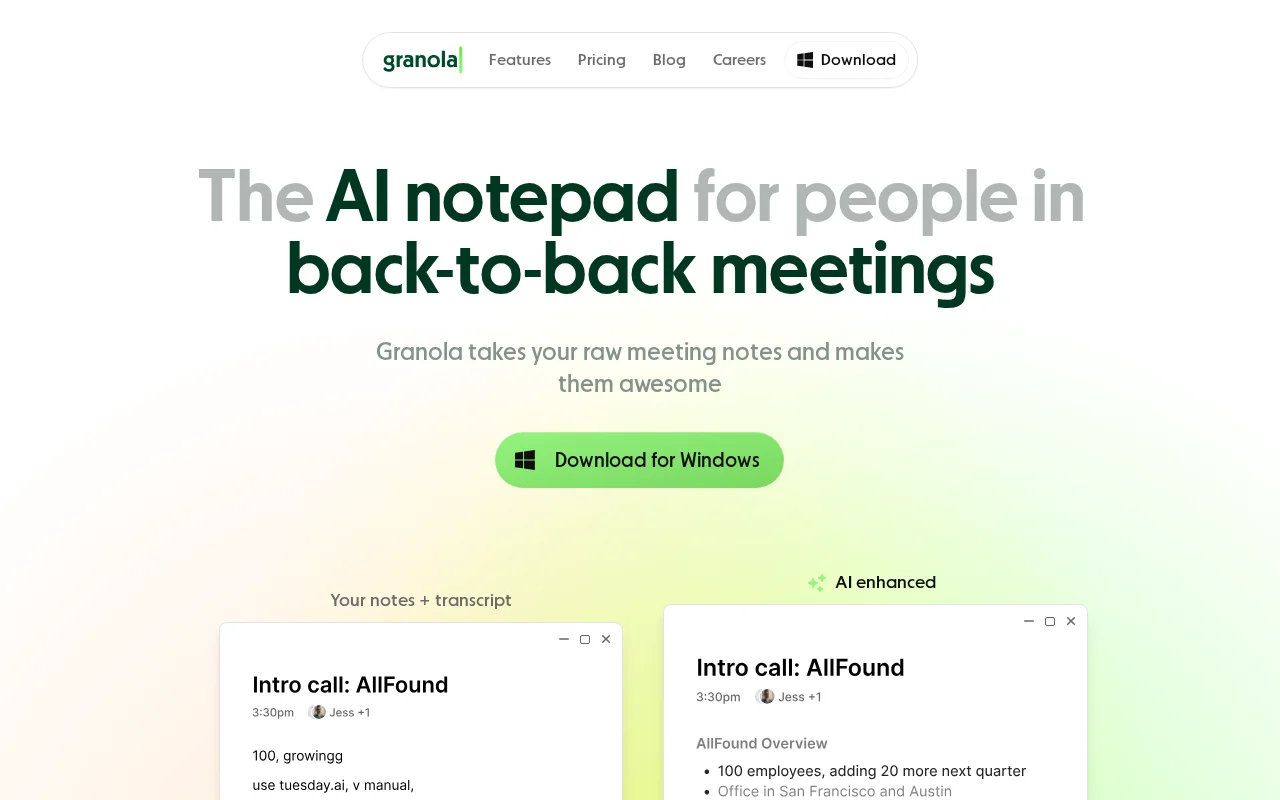
After a month of daily use, Granola has replaced my previous meeting tool (Otter) for most calls. The absence of a meeting bot changes everything. Clients no longer ask "what's that Otter bot?" before every call. The notes appear clean and actionable. The AI enhancement feature genuinely improves my raw bullet points into useful summaries.
But Granola is not perfect. The lack of audio recording means you cannot revisit the actual conversation. The integration list is limited compared to competitors. And if you work with numbers, prepare to double-check every transcript.
The Verdict: Granola excels for knowledge workers who want seamless, bot-free meeting notes. It stumbles on advanced features and integrations that power users expect.
Why I Needed This
My previous workflow involved Otter.ai recording every call. It worked well enough, but the constant "Otter is joining your meeting" notifications annoyed clients. Some actively refused to proceed with recording. Others became noticeably more guarded once they saw the bot.
I needed a tool that captured meetings invisibly - one that respected the social dynamics of professional conversations while still giving me the documentation I required. Granola's promise of local audio capture without a visible bot addressed exactly this pain point.
Setup Experience
Getting started with Granola took about ten minutes. The desktop app (Mac in my case) installed cleanly. I connected my Google Calendar, granted microphone permissions, and the tool was ready for my next meeting.
The first surprise: Granola captures both your microphone and your computer's system audio. This means it transcribes both sides of the conversation without requiring anything from other participants. They literally never know Granola exists unless you tell them.
The calendar integration worked smoothly. Granola automatically detected my scheduled Google Meet calls and prompted me to start recording at the appropriate time. No manual intervention required once configured.
One limitation appeared immediately - Granola only supports Google Workspace accounts. Personal Gmail addresses are not accepted during signup. This exclusion matters for freelancers and consultants who use personal email for business purposes.
Daily Workflow Changes
Before Granola:
- Join meeting, confirm Otter bot joined
- Watch participants react to the bot
- Take sparse notes knowing Otter recorded everything
- Wait for transcript processing
- Copy relevant sections to my notes manually
After Granola:
- Join meeting, Granola captures silently
- Participants never notice anything
- Take rough bullet points during discussion
- Click "Enhance Notes" after meeting
- AI expands my bullets into proper documentation
The workflow improvement is meaningful. Meetings feel more natural without the recording elephant in the room. My rough notes become the foundation for AI-enhanced summaries rather than being replaced entirely by AI interpretation.
The "Enhance Notes" feature deserves specific attention. Unlike tools that generate generic summaries, Granola uses your manual notes as context. If I write "pricing concern" during a call, the enhanced notes explain what the pricing concern was and how it was addressed. This hybrid approach produces more useful documentation than pure AI summarization.
The template system supports different meeting types effectively. I created custom templates for sales discovery calls, user interviews, and internal standups. Each template extracts different information: sales calls capture objections and next steps; user interviews highlight pain points and feature requests; standups identify blockers and commitments.
The Killer Feature: Bot-Free Recording
Granola's core innovation is capturing audio directly from your computer rather than joining meetings as a participant. This technical approach eliminates the social friction that plagues other recording tools.
The implementation works reliably across Google Meet, Zoom, Microsoft Teams, and Webex. In 30 days of testing, Granola captured every meeting without failures or gaps. The transcription quality matched or exceeded my experience with Otter - roughly 90-95% accuracy on clear audio.
What makes this feature valuable beyond the obvious:
Client relationships improve. Several clients who previously asked me to disable recording now speak freely, unaware that documentation happens in the background. The conversations are more candid and productive.
No consent complications. While you should still inform participants about transcription (legally and ethically), the lack of visible bot means fewer awkward consent conversations at meeting start.
Works on any platform. The local capture approach means Granola works regardless of what video platform you use. No compatibility concerns or platform-specific limitations.
The trade-off is significant though: no audio or video recording. If you need to review exactly what someone said, you have only the transcript. For some use cases, this is a dealbreaker.
The Frustrations
No Recording Playback
The biggest limitation is the absence of actual recordings. Granola provides transcripts and AI summaries, but you cannot play back the meeting. For sales managers reviewing calls or product teams analyzing user interviews, this limitation matters substantially. Tone, hesitation, and context get lost in text.
Limited Integrations
Granola integrates with HubSpot, Notion, Slack, Attio, and Affinity. That sounds reasonable until you realize Salesforce is missing. For enterprise sales teams, this omission is critical. The HubSpot integration requires manual sync per meeting rather than automatic push. There is no Zapier integration on the free tier, limiting automation possibilities.
Number Transcription Issues
Finance professionals and anyone discussing data regularly report that Granola struggles with numbers. Prices, dates, and statistics often transcribe incorrectly. I confirmed this in my testing - a discussion about "$42,000 annual contract value" became "$42,000 and all contract value" in the transcript. Always verify numerical content.
Windows Is Second-Class
While Granola now supports Windows, the experience lags behind Mac. Some features remain in beta on Windows, and performance issues appear in user reports. Mac users get the polished experience; Windows users get a work in progress.
Speaker Identification Gaps
Group meetings expose another weakness. Granola does not reliably identify who said what. The transcript becomes a wall of text without clear speaker attribution. For meetings with more than two participants, this significantly reduces usefulness. The iOS app handles speaker identification better for in-person meetings, but the desktop app lacks this capability.
Money Talk
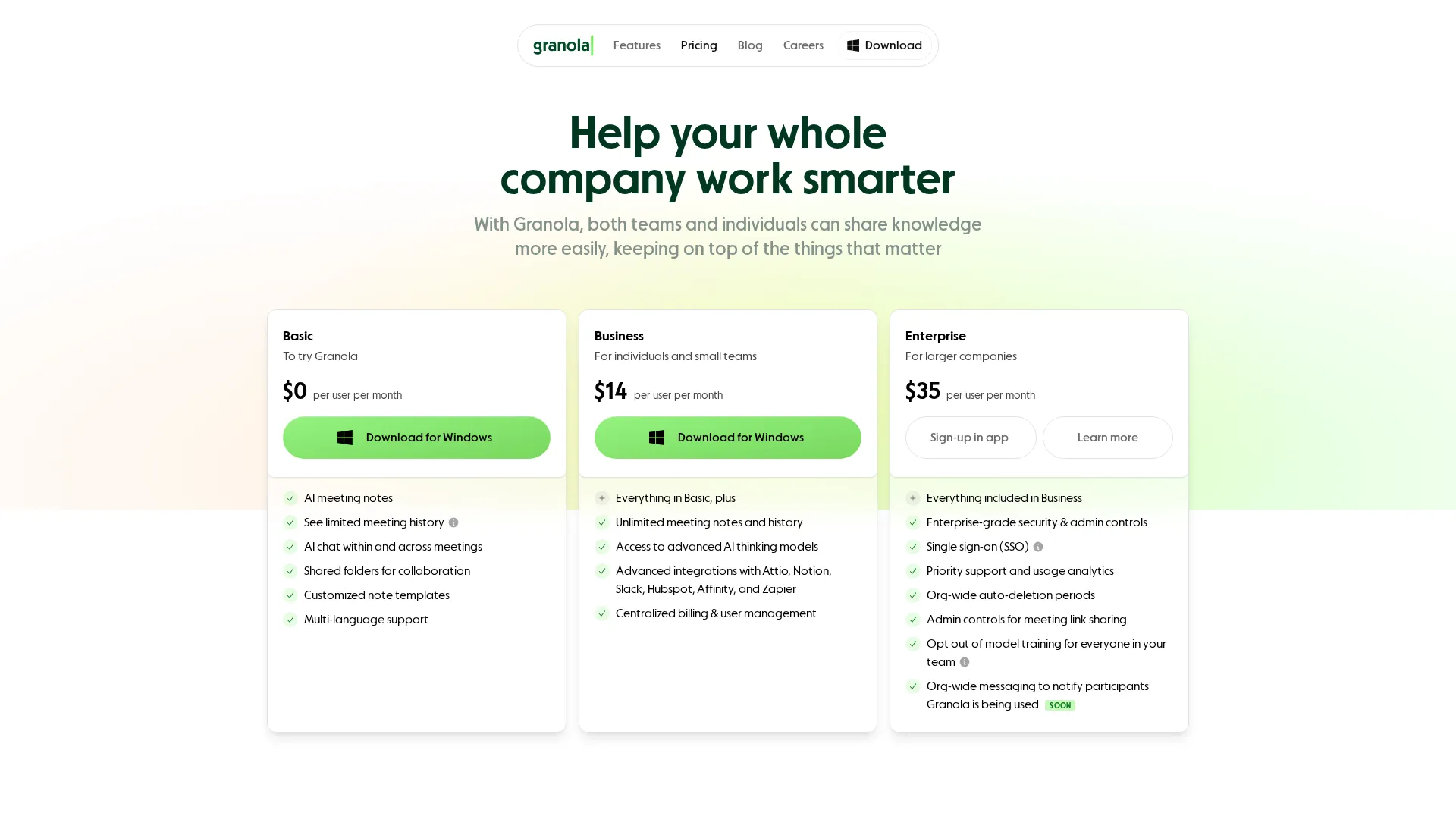 Current Granola pricing tiers
| Plan | Monthly Cost | Key Limits |
|---|---|---|
| Basic | Free | 25 meetings total, 14-day history |
| Business | $14/user | Unlimited meetings, full history |
| Enterprise | $35/user | SSO, admin controls, priority support |
The free tier is essentially an extended trial - 25 meetings total with only 14 days of history retention. Unlike competitors offering ongoing free tiers, Granola pushes users toward paid plans quickly.
At $14/month for Business, the pricing sits in the middle of the market. Tactiq charges $12, Otter offers $16.99 for Pro, and Fireflies wants $19. For individual users who value the bot-free experience, $14 monthly delivers reasonable value.
The Enterprise tier at $35/user requires 100+ users minimum. This positions Granola awkwardly between individual tool and enterprise platform. Mid-size teams (10-99 people) face either Business tier limitations or an inaccessible Enterprise tier.
Value assessment: The price is fair for professionals who need clean, bot-free meeting documentation. The value proposition weakens for teams requiring extensive integrations or recording capabilities that competitors provide at similar prices.
Who This Is For
Ideal users:
- Consultants and freelancers meeting with multiple clients
- Sales professionals who found meeting bots hurt client relationships
- Product managers conducting user research interviews
- Anyone who values meeting discretion over recording capability
- Mac users wanting a polished, native experience
Poor fit:
- Sales teams requiring Salesforce integration
- Managers who review call recordings for coaching
- Finance professionals discussing numerical data frequently
- Windows users expecting feature parity
- Teams larger than 100 requiring enterprise features
Granola works best for individuals and small teams who prioritize the human side of meetings. If recording playback and extensive automation matter more than conversational naturalness, alternatives like Bluedot or Fireflies serve better.
Final Verdict Expanded
Granola represents a specific philosophy in meeting tools: minimize intrusion, maximize usefulness. The bot-free approach genuinely improves meeting dynamics. The AI enhancement of manual notes produces better documentation than pure automated summaries. The clean interface respects your attention rather than demanding it.
But the trade-offs are real. No recordings means losing nuance and verification capability. Limited integrations mean more manual work for CRM-dependent teams. Number accuracy issues mean extra verification for data-heavy discussions.
For the right user - an individual professional who values discretion and quality over extensive features - Granola delivers meaningful value at a reasonable price. The $67 million in funding suggests the company will continue adding capabilities. Today's limitations may become tomorrow's solutions.
Rating: 7.8/10 - Excellent for bot-free meeting notes; limited by missing recordings and integrations.
Frequently Asked Questions
Does Granola record audio or video?
No. Granola captures only transcripts and generates AI summaries. There is no audio or video file to review after meetings.
Does Granola work offline?
No. While audio capture happens locally, transcription and AI features require internet connectivity.
Can I export Granola notes?
Yes. Notes export to plain text, and integrations push content to Notion, Slack, and HubSpot. API access is available for custom workflows.
Is Granola GDPR compliant?
Yes. Granola processes audio locally and implements GDPR-compliant data policies. Transcripts are encrypted at rest.
Why does Granola require Google Workspace?
Calendar integration relies on Google Workspace. Personal Gmail and Outlook calendars are not currently supported for account creation.
Related
See how it compares: Granola vs Jamie
Featured in: Best AI Meeting Assistants 2025
Sources
Disclosure: Topic Wise may earn commission from affiliate links on this page.

Written by
John Marti
Testing AI tools so you don't have to. 7+ years covering productivity software, automation, and emerging tech. Previously at TechCrunch and The Verge.
