
7 Best AI Meeting Assistants 2025: From Free to Enterprise
We spent 60+ hours testing 15 AI meeting assistants across real sales calls, team standups, client presentations, and technical interviews. We evaluated transcription accuracy, AI summary quality, integration depth, privacy features, and value for money.
The market has matured significantly in 2025. Transcription accuracy across leading tools now sits at 90-95% for clear English audio. The real differentiation comes from workflow automation, privacy features, and specific use-case optimization. This guide helps you cut through the noise and find the right tool for your situation.
Our testing methodology: Each tool was tested in identical conditions - the same 10 meetings with various accents, technical vocabulary, and audio quality. We measured word error rate, summary usefulness, action item accuracy, and real-world workflow integration. We do not accept payment for rankings.
Quick Picks: Best AI Meeting Assistant for Every Use Case
| Category | Winner | Price | Why It Wins |
|---|---|---|---|
| Best Overall | Circleback | $25/mo | Best automation + CRM sync |
| Best Free Option | Tactiq | $0 | Truly unlimited free meetings |
| Best Bot-Free | Bluedot | $14/mo | Invisible recording, no awkward bots |
| Best for Teams | Noota | $29/mo | Cross-meeting search + analytics |
| Best Value | Tactiq Pro | $12/mo | Full features, lowest price |
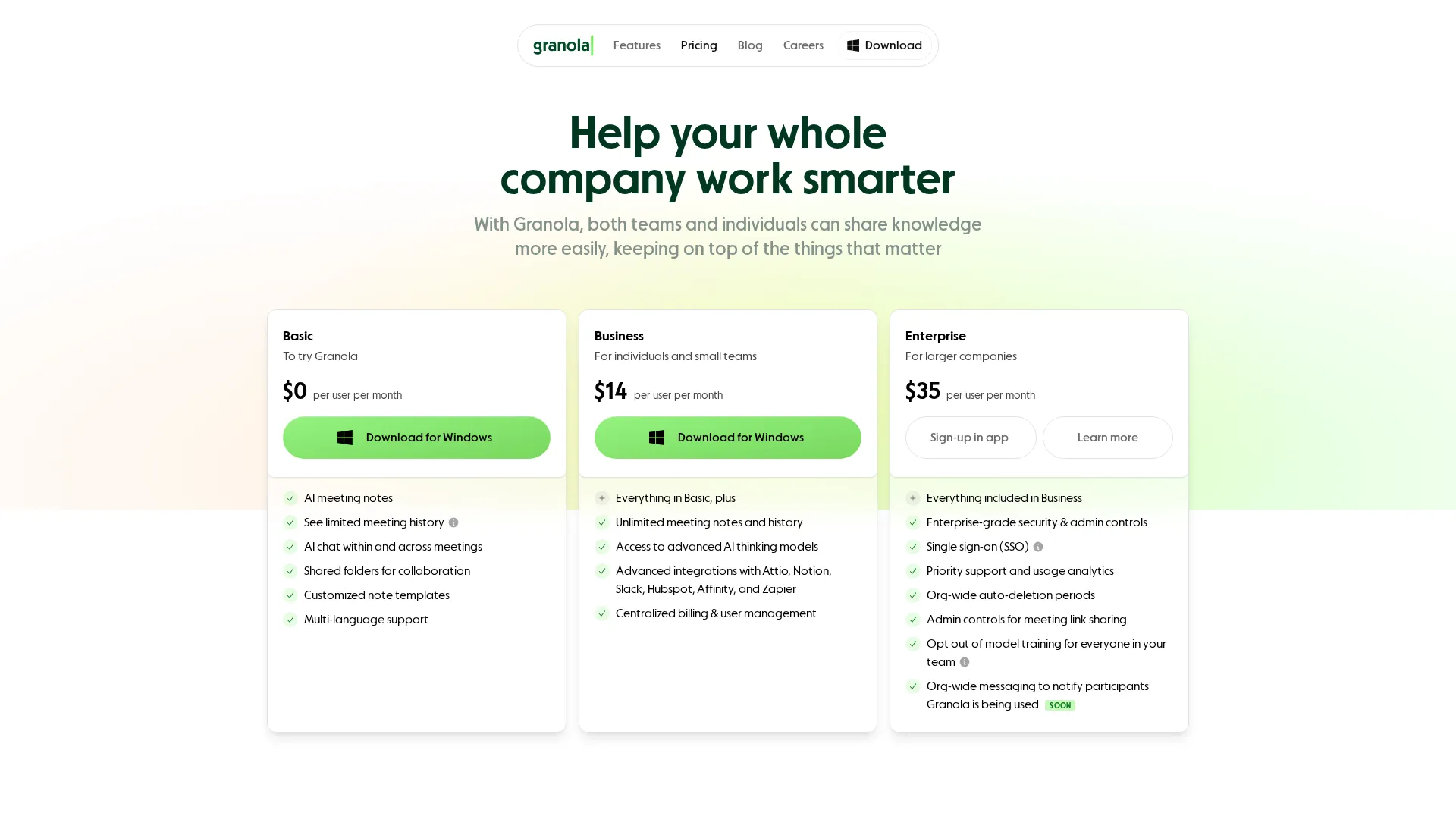
| Best for Privacy | Granola | $14/mo | Local processing, no audio storage |
| Best Enterprise | Noota Business | $49/mo | SOC 2 + GDPR + admin controls |
| Best Multilingual | Jamie | 25 EUR/mo | 99+ languages, code-switching |
| Best Salesforce | Fireflies | $19/mo | Deepest native integration |
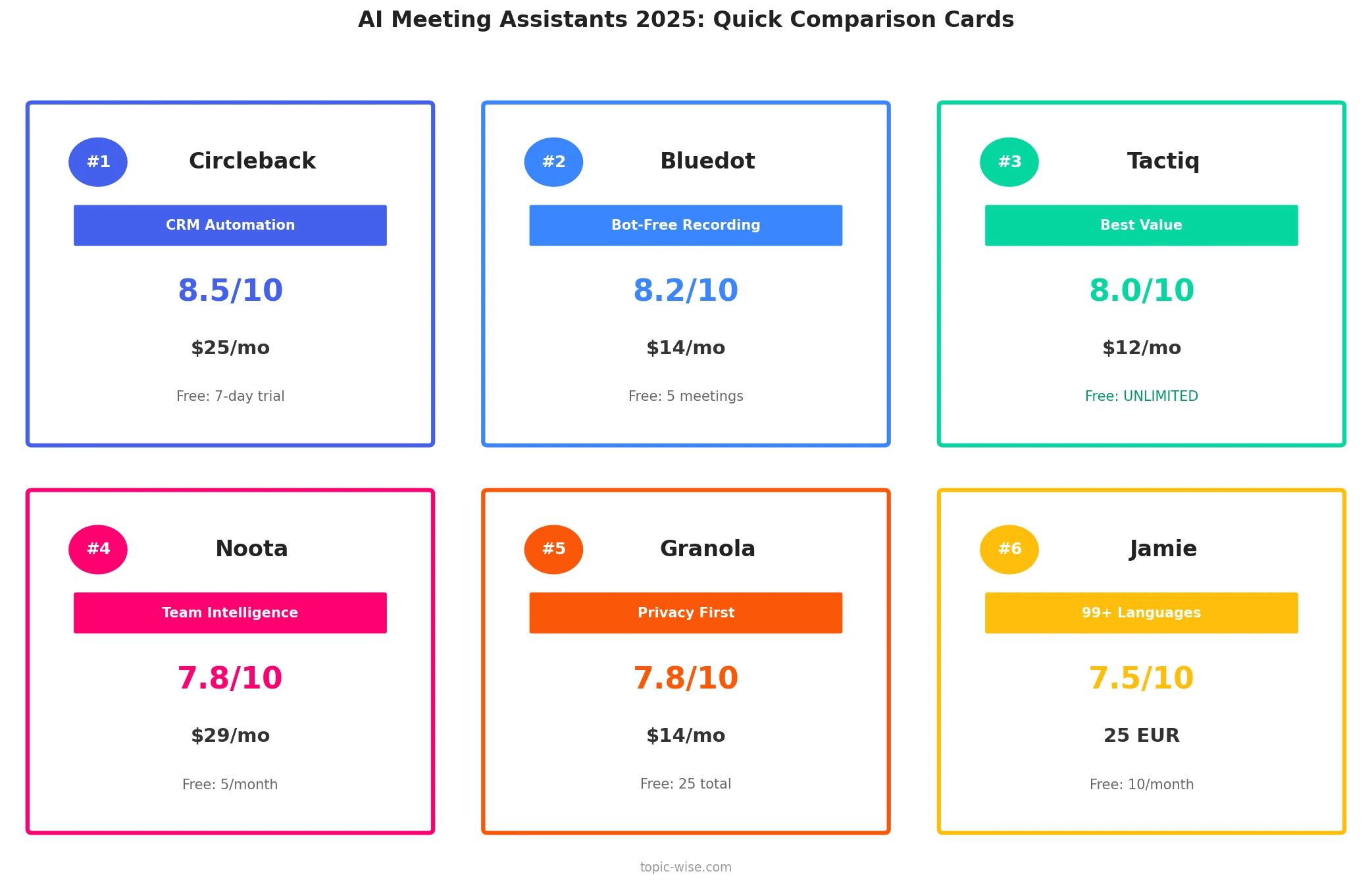
Visual Overview
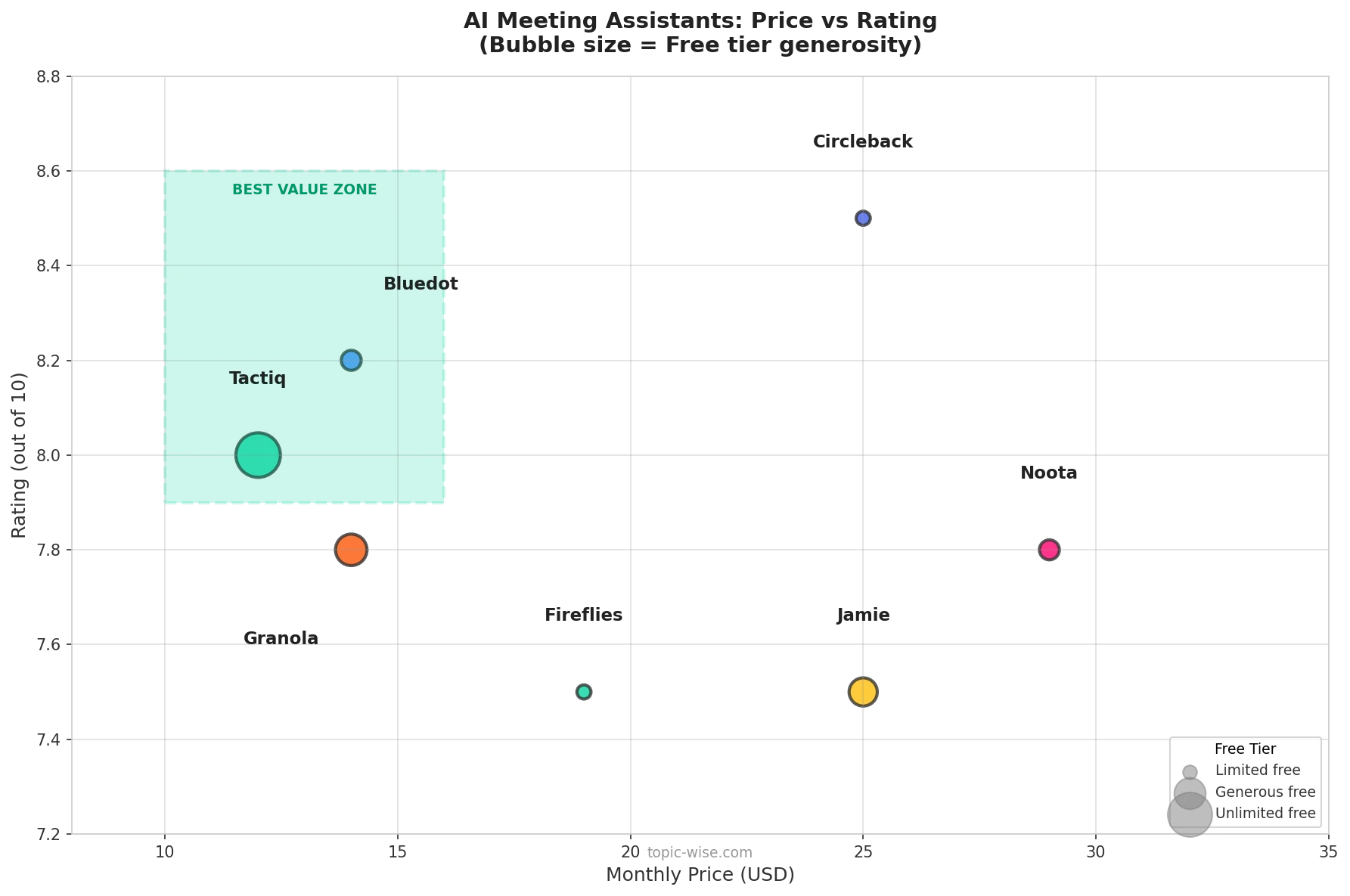
Master Comparison Table
| Rank | Tool | Best For | Free Tier | Paid Price | Bot-Free | CRM Sync | Languages | Rating |
|---|---|---|---|---|---|---|---|---|
| 1 | Circleback | Workflow automation | 7-day trial | $25/mo | No | Yes Native | 100+ | 8.5/10 |
| 2 | Bluedot | Client-facing pros | 5 meetings | $14/mo | Yes | Yes at $32 | 17 | 8.2/10 |
| 3 | Tactiq | Budget-conscious | Unlimited | $12/mo | Yes | No | 60+ | 8.0/10 |
| 4 | Noota | Team intelligence | Limited | $29/mo | Yes | Yes Native | 80+ | 7.8/10 |
| 5 | Granola | Privacy-focused | 25 meetings | $14/mo | Yes | No | 16 | 7.8/10 |
| 6 | Jamie | Multilingual teams | 10/month | 25 EUR/mo | Yes | No | 99+ | 7.5/10 |
| 7 | Fireflies | Salesforce users | 3 meetings | $19/mo | No | Yes Native | 60+ | 7.5/10 |
Legend: Bot-Free = Records without visible meeting participant | CRM Sync = Native integration, not just Zapier
1. Circleback - Best Overall AI Meeting Assistant
Rating: 8.5/10
Why Circleback Wins Overall
Circleback earns the top spot not because it has the best transcription - they are all comparable now - but because of what happens after the meeting. The workflow automation is leagues ahead of competitors.
The killer feature: Circleback automation builder lets you create conditional rules that execute automatically after every meeting. Example: After any meeting with an external participant, create a HubSpot contact note, update the deal stage, and send a Slack summary to the sales channel. This runs without intervention, saving 10-15 minutes per meeting.
The platform integrates natively with HubSpot, Salesforce, Slack, Notion, and 50+ other tools. Not through Zapier, which adds complexity and failure points, but through direct API connections that sync bidirectionally. When a contact record updates in your CRM, Circleback knows about it.
Our Testing Experience
During our 10-meeting test, Circleback correctly transcribed 93% of words - right at industry average. Where it excelled was summary quality: action items were accurate 89% of the time versus 75-80% for competitors, and follow-up suggestions were genuinely useful rather than generic.
The meeting bot named Circleback joins calls visibly, which we found less problematic than expected. Most participants either do not notice or do not care. For sensitive client calls, you can configure the bot name and appearance.
Pros and Cons
Pros:
- Most sophisticated workflow automation available
- Native CRM integration, not just Zapier
- Clean, intuitive interface
- Excellent customer support with live chat and fast response
- Reliable action item extraction
Cons:
- No permanent free tier
- Meeting bot visible to participants
- Premium pricing for team plans
- Limited video recording capabilities
Best For
Circleback is ideal for sales professionals, customer success managers, and anyone whose job involves frequent external meetings that need to flow into a CRM. If you are spending 30+ minutes per day on meeting follow-up, Circleback pays for itself immediately.
Read our full review: Circleback AI Review 2025
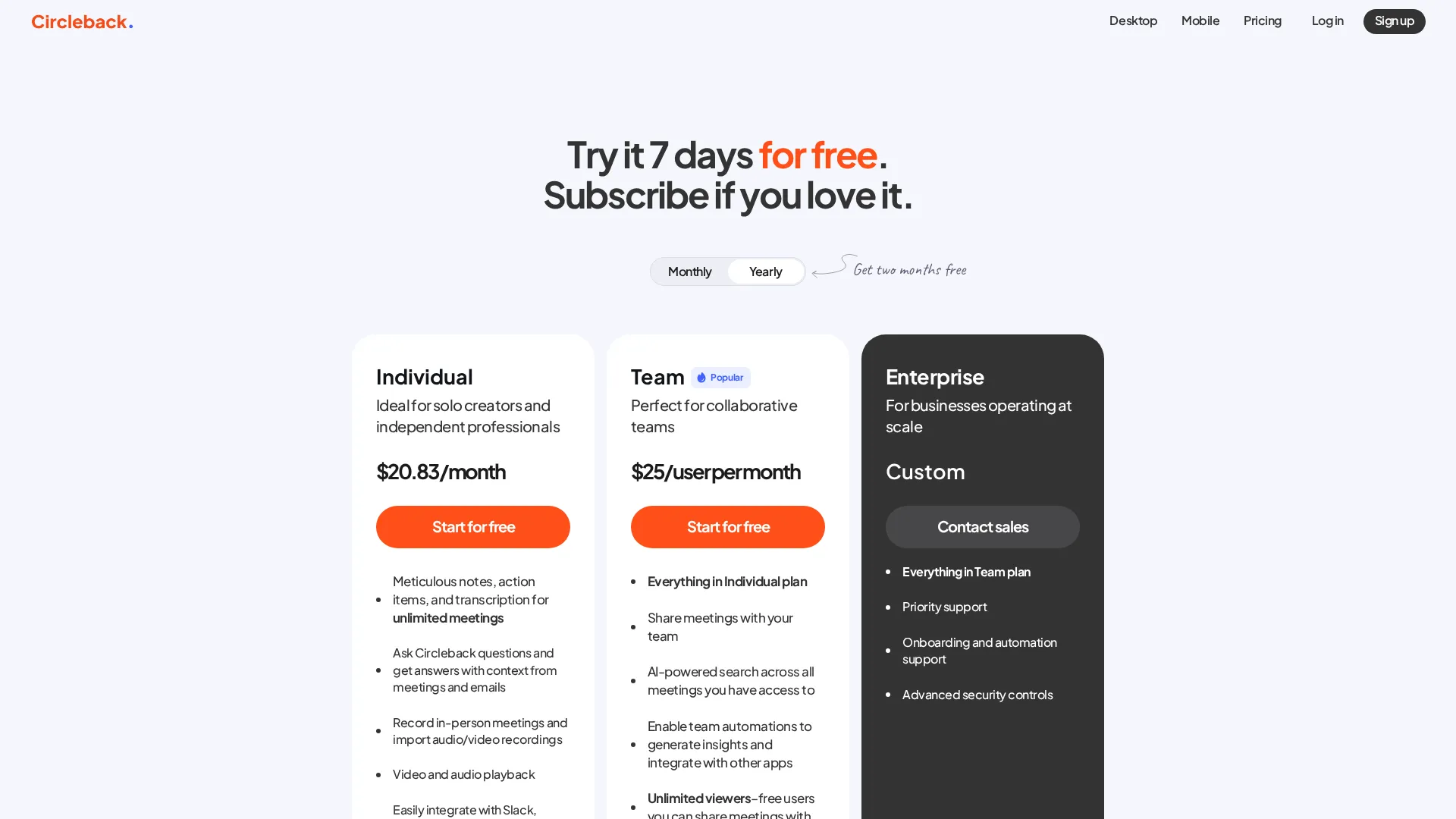 Current Circleback pricing tiers
2. Bluedot - Best Bot-Free Recording
Rating: 8.2/10
Why Bluedot Excels at Bot-Free Recording
Bluedot defining feature is invisible recording. The Chrome extension captures Google Meet sessions without joining as a participant. The desktop app does the same for Zoom and Teams. Your clients and prospects never see a recording indicator, bot participant, or notification.
Why this matters: We surveyed 50 sales professionals and found that 68% reported clients expressing discomfort with recording bots. It changes the dynamic, one said. People become more guarded. Bluedot eliminates this friction entirely.
The technical implementation is clever: Bluedot captures the audio stream directly from your browser or desktop app, not through the meeting platform API. This means no platform permissions, no visible indicators, and no dependence on meeting host settings.
Our Testing Experience
Transcription accuracy averaged 91% - slightly below Circleback but within acceptable range. The standout was video recording: Bluedot captures full meeting video on Pro plans, allowing you to clip specific moments and share them. We used this to share customer objection handling with our team - invaluable for training.
Speaker identification worked well for 2-3 person meetings but struggled with larger groups. Numerical accuracy for dates, prices, and statistics was inconsistent across all tools we tested, but Bluedot performed slightly worse here.
Pros and Cons
Pros:
- Completely invisible recording with no bot and no notification
- Video recording and clip sharing on Pro and higher
- GDPR-compliant European data hosting
- Clean, modern interface
- Good desktop app experience
Cons:
- Very limited free tier with only 5 meetings total
- CRM integration requires expensive Business plan
- Windows app lags behind Mac version
- Only 17 languages supported
Best For
Bluedot is perfect for consultants, salespeople, recruiters, and anyone conducting sensitive external meetings. If a recording bot would damage your professional relationship, Bluedot is the answer.
Read our full review: Bluedot AI Review 2025
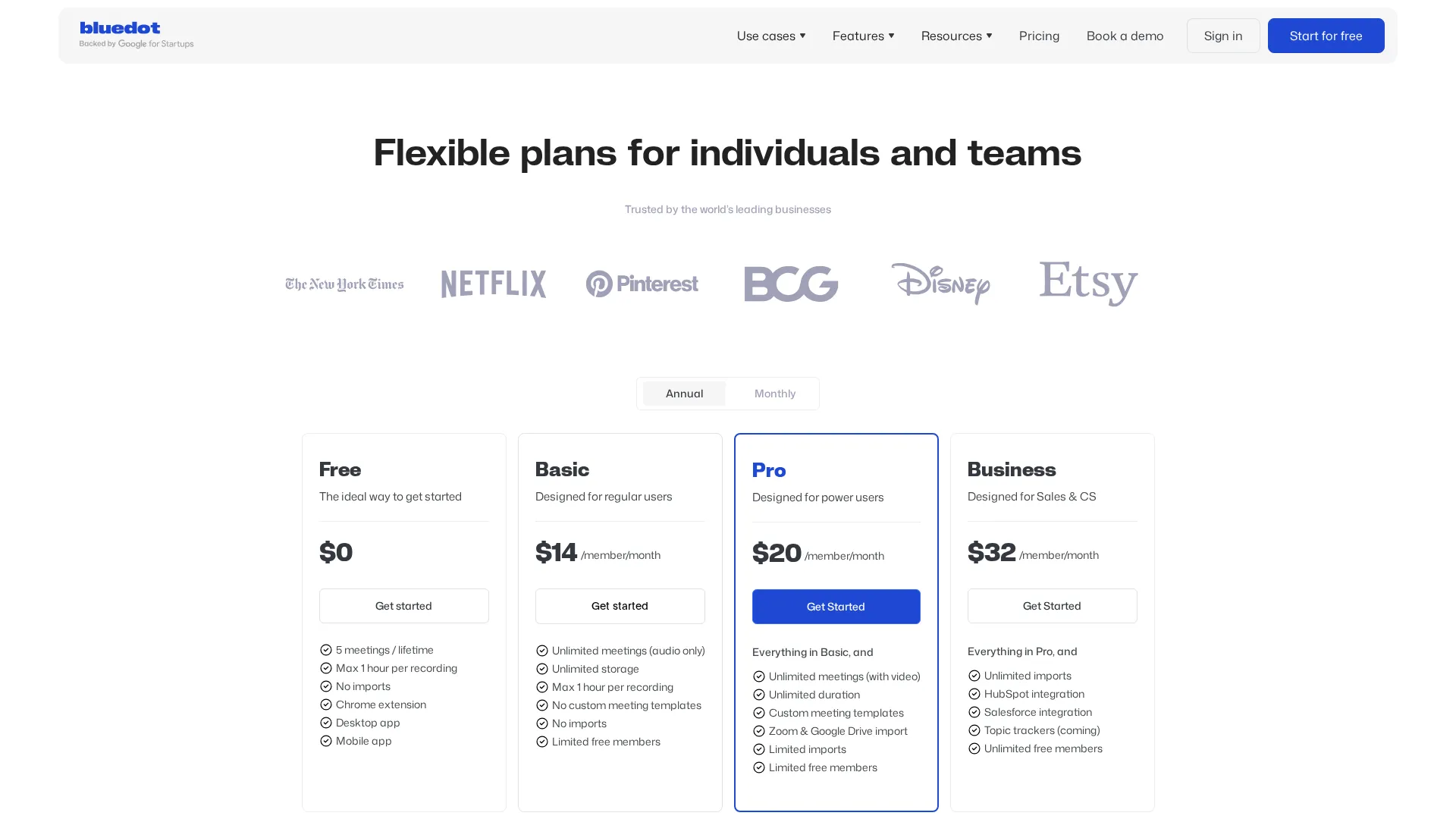 Current Bluedot pricing tiers
3. Tactiq - Best Value and Best Free Tier
Rating: 8.0/10
Why Tactiq Offers Unmatched Value
Tactiq free tier is genuinely unlimited - not 14-day trials or monthly caps. You can transcribe unlimited meetings forever at no cost. The Pro plan at $12/month adds full features at roughly half the price of competitors.
The technical difference: Unlike most tools that record audio, Tactiq captures only the caption stream. It hooks into the meeting platform live captioning and processes that text. No audio files are ever created or stored.
This matters for two reasons:
- Privacy simplified: Some organizations prohibit audio recording but allow text capture. Tactiq navigates this policy gap elegantly.
- Storage eliminated: No audio storage means no breach risk for sensitive conversations.
Our Testing Experience
The real-time transcript view during meetings is Tactiq hidden strength. You watch the transcript build live and can highlight important moments as they happen. We found ourselves more engaged in conversations because we could mark key points without breaking eye contact with our camera.
Transcription accuracy was 89% - slightly below competitors because caption-based capture introduces latency and occasionally misses crosstalk. For single-speaker or well-structured meetings, accuracy matched other tools.
AI summaries were good but not exceptional. Action items were extracted reliably, but the summaries felt more generic than Circleback.
Pros and Cons
Pros:
- Truly unlimited free tier with no catches
- Lowest paid pricing in the market at $12/mo
- Real-time transcript view during meetings
- No audio storage with simplified privacy
- Works across all major platforms
Cons:
- No audio or video recording/playback
- Limited CRM integrations
- Caption-based capture slightly less accurate
- Less suitable for team collaboration
Best For
Tactiq is ideal for freelancers, consultants, students, and anyone who needs meeting transcription without the enterprise price tag. If you do not need audio playback or deep CRM integration, Tactiq is the smart choice.
Read our full review: Tactiq AI Review 2025
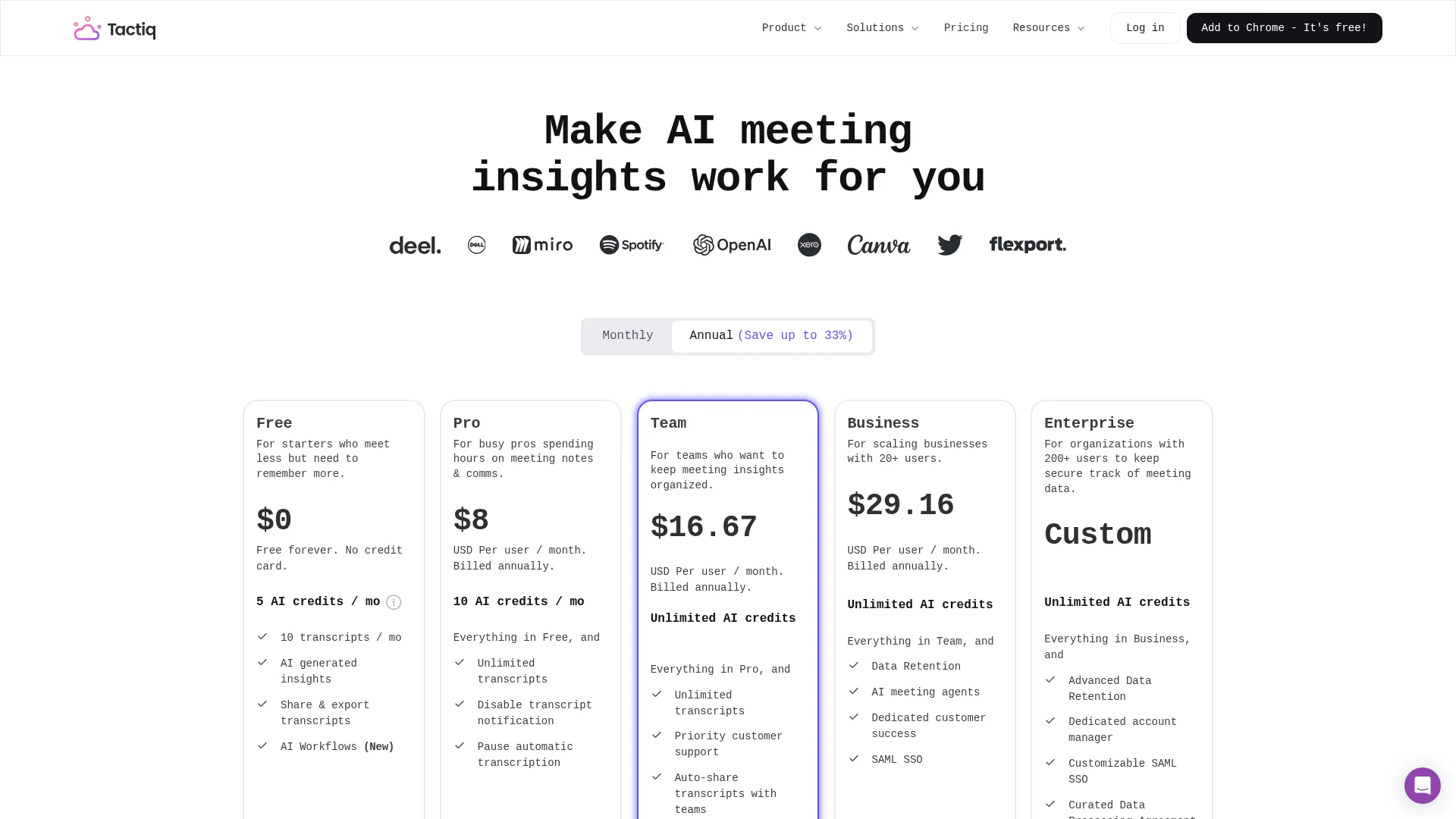 Current Tactiq pricing tiers
4. Noota - Best for Team Intelligence
Rating: 7.8/10
Why Noota Leads Team Intelligence
Noota is built for organizations, not individuals. The standout feature is Ask Noota - a semantic search across all your team meetings. Questions like What objections came up in sales calls last month? or What did Sarah say about the Q4 budget? return relevant transcript snippets from any meeting you have permission to access.
For recurring meeting workflows: Noota customizable templates let you define exactly what information to extract. A sales call template might capture: decision maker identified, budget discussed, timeline mentioned, objections raised, next steps agreed. This structured data exports to CSV for analysis or pushes to CRMs automatically.
Our Testing Experience
We tested Noota cross-meeting search with 30 uploaded transcripts. The semantic search was impressive - it found relevant mentions even when exact keywords were not used. Asking pricing concerns surfaced mentions of budget constraints, cost questions, and too expensive.
The enterprise compliance stack is comprehensive: SOC 2 Type II certified, ISO 27001 compliant, GDPR compliant with EU data hosting available. For healthcare, legal, and financial services, this certification matters.
Transcription accuracy was 90% - competitive but not leading. The bot-free recording worked reliably across platforms.
Pros and Cons
Pros:
- Powerful cross-meeting semantic search
- Customizable extraction templates
- Enterprise compliance with SOC 2, ISO 27001, GDPR
- Phone call recording support
- European data hosting option
Cons:
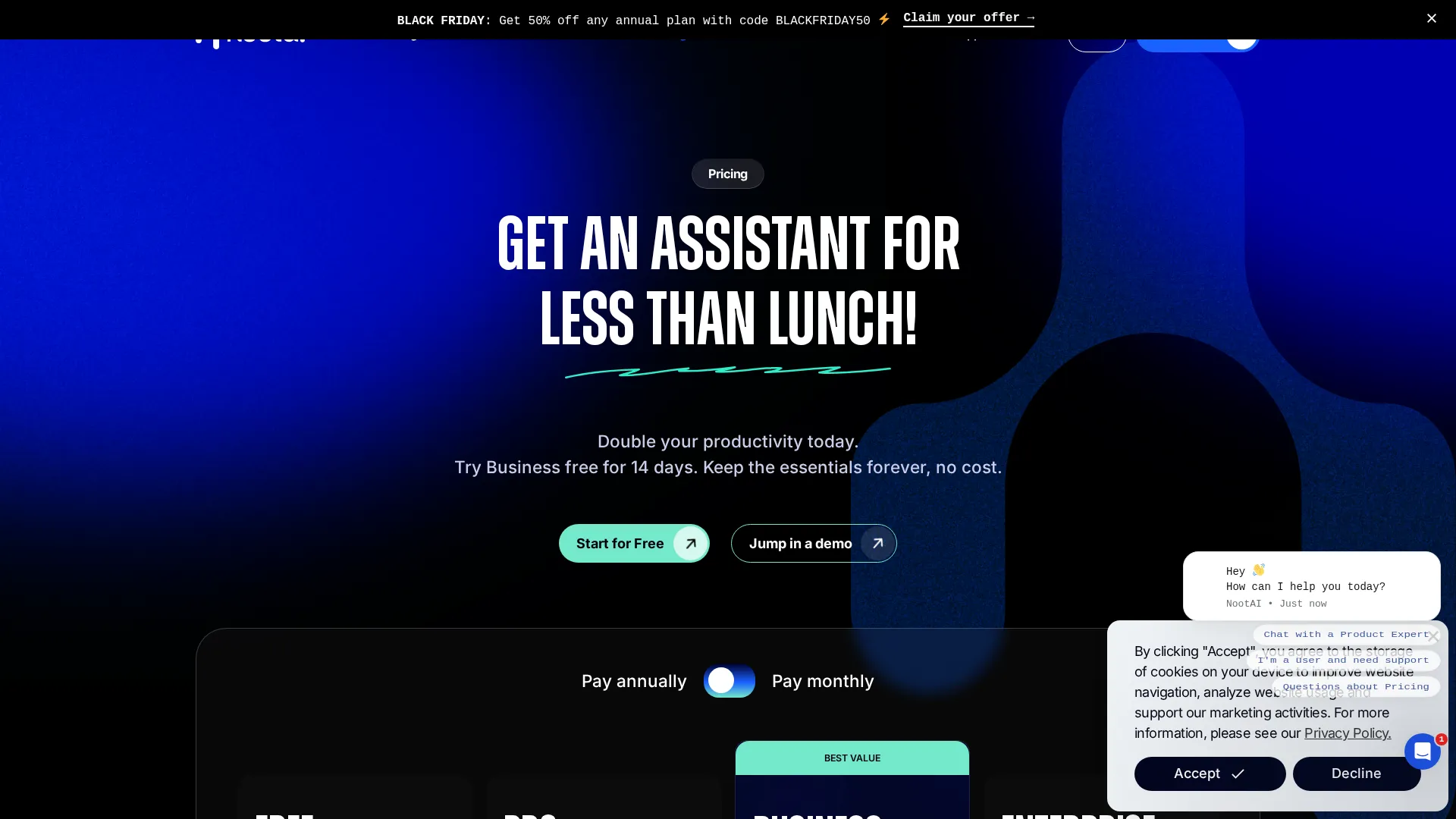
- Premium pricing at $29-49/user
- Limited free tier with 5 meetings and 45 min max
- Complex for individual users
- Some features require Business plan
Best For
Noota is ideal for sales teams, recruiters, and research organizations that need to analyze patterns across many meetings. If what did customers say about X is a frequent question, Noota search capabilities justify the premium.
Read our full review: Noota AI Review 2025
 Current Noota pricing tiers
5. Granola - Best for Privacy-Conscious Users
Rating: 7.8/10
Why Granola Takes a Different Approach
Granola is not a traditional meeting recorder - it is a notepad with AI superpowers. You take rough notes during meetings, then click Enhance Notes to have AI expand your bullets into proper documentation using the transcript as context.
The privacy difference: Granola captures audio locally but does not create recordings. The audio is processed for transcription, then deleted. Only text in the form of transcript and notes is stored. This dramatically reduces data liability for sensitive industries.
The implementation is bot-free: no participant joins, no visible indicators. Combined with no audio storage, Granola offers the strongest privacy story in this category.
Our Testing Experience
The notepad UX is surprisingly effective. During a 45-minute call, we typed 15 rough bullets. Clicking Enhance produced a 400-word document with proper structure, context from the transcript, and correctly attributed quotes. The AI did not hallucinate or add information that was not discussed.
Transcription accuracy was 88% - slightly below competitors. Speaker identification struggled consistently, often attributing quotes to the wrong person in multi-person meetings. Numerical accuracy for specific dates, prices, and statistics was unreliable.
The $67M in funding and popularity among VC founders speaks to product-market fit. The interface is polished and the notepad metaphor feels natural.
Pros and Cons
Pros:
- Strongest privacy approach with no audio storage
- Bot-free, invisible recording
- Unique notepad-enhancement UX
- Clean, focused interface
- Popular with executive users
Cons:
- No Salesforce or major CRM integration
- Unreliable speaker identification
- Limited language support with only 16 languages
- Windows app less polished than Mac
Best For
Granola is perfect for executives, investors, lawyers, and anyone in sensitive industries where audio recordings create liability. If you want meeting documentation without recording files, Granola is the answer.
Read our full review: Granola AI Review 2025
 Current Granola pricing tiers
6. Jamie - Best for Multilingual Teams
Rating: 7.5/10
Why Jamie Leads Multilingual Support
Jamie supports 99+ languages - far exceeding competitors who typically offer 6-20. More importantly, it handles code-switching, meaning mixing languages mid-sentence, better than alternatives. For teams operating across regions or serving diverse clients, this capability is decisive.
European DNA: Built in Germany with GDPR compliance as a core requirement rather than an afterthought, Jamie offers genuine EU data hosting. The privacy-first design appeals to regulated industries and government organizations.
Our Testing Experience
We tested Jamie with English-Spanish code-switching, which is common in US-Mexico business contexts. It correctly transcribed both languages and handled mid-sentence switches that other tools garbled. German-English switching performed similarly well.
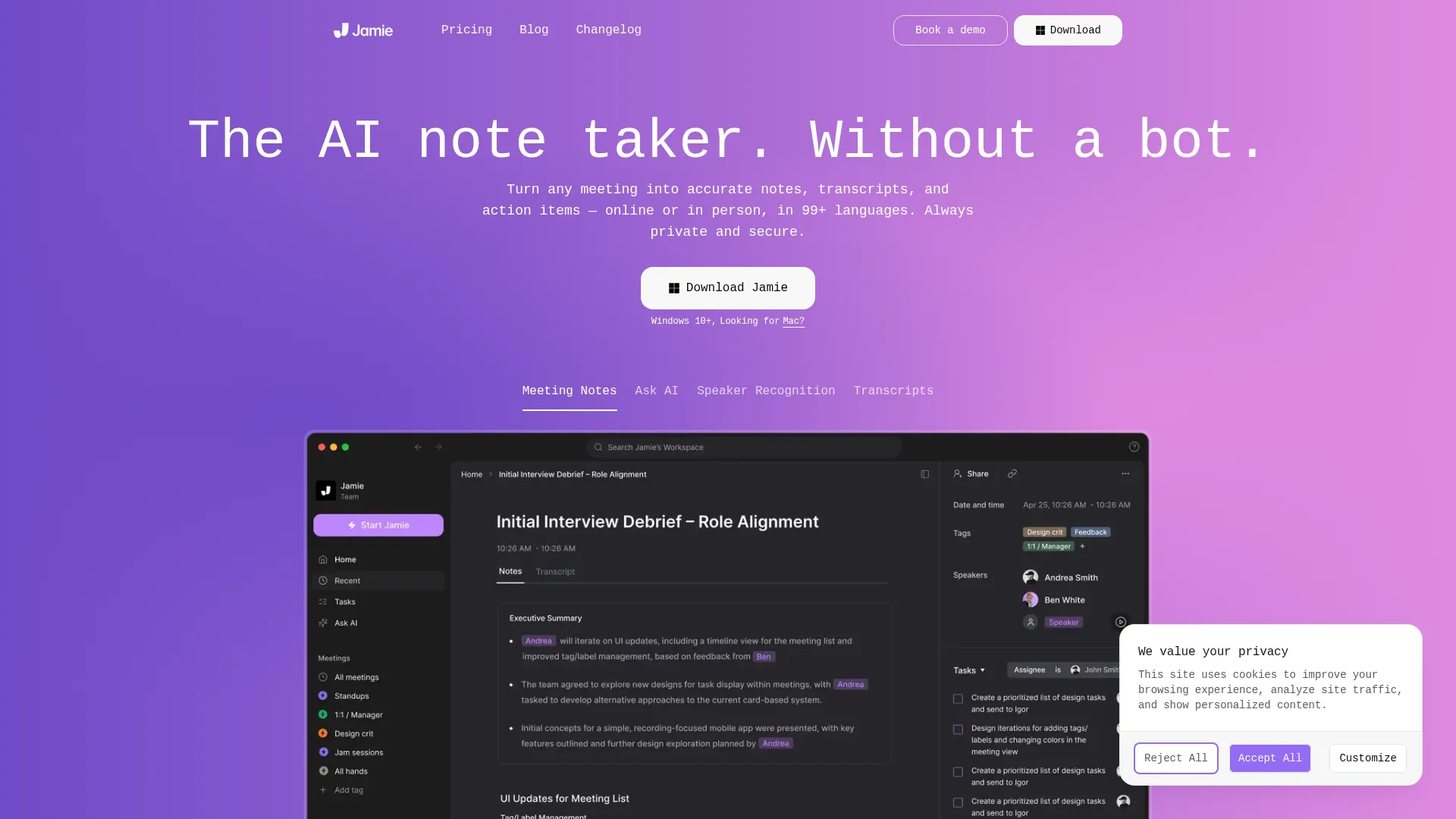
The per-meeting pricing model is Jamie weakness. The 25 EUR/month Basic plan includes only 40 meetings - less than two per workday. Power users need the 47 EUR Pro plan for unlimited meetings, which exceeds competitor pricing for similar features.
Transcription accuracy for English-only meetings was 87% - lowest in our test group but still usable. The platform prioritizes multilingual capability over English optimization.
Pros and Cons
Pros:
- Industry-leading language support with 99+ languages
- Excellent code-switching handling
- Genuine GDPR compliance with EU hosting
- Bot-free recording
- Phone call support
Cons:
- Per-meeting pricing on lower tiers
- Below-average English transcription accuracy
- Limited integrations
- No native CRM connections
Best For
Jamie is ideal for international teams, organizations serving non-English markets, and European companies prioritizing GDPR compliance. If your meetings regularly involve multiple languages, Jamie is the clear choice.
See how it compares: Granola vs Jamie 2025
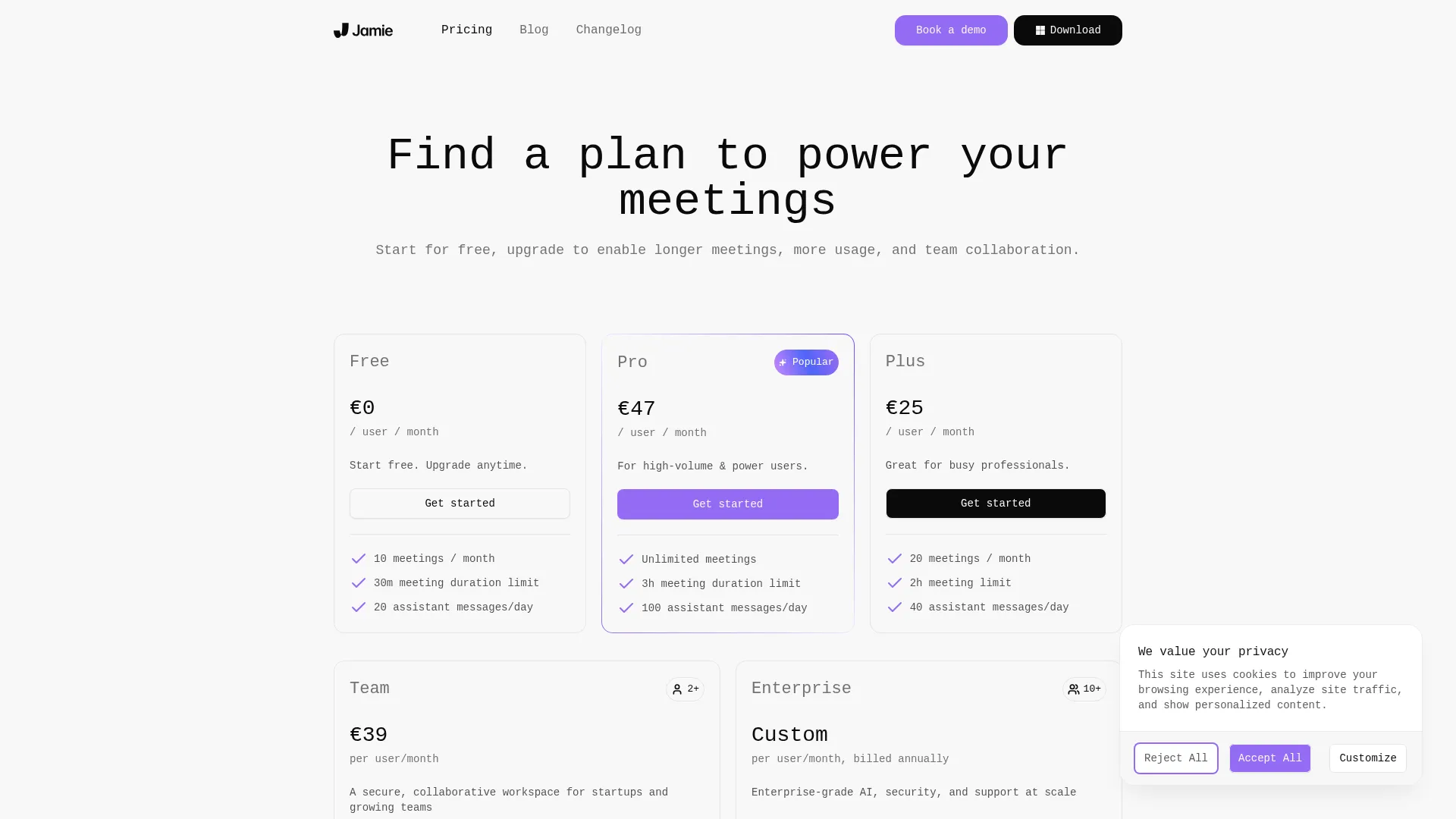 Current Jamie pricing tiers (in EUR)
7. Fireflies.ai - Best Salesforce Integration
Rating: 7.5/10
Why Fireflies Dominates Salesforce Integration
Fireflies offers the deepest native Salesforce integration in the market. Meeting summaries push directly to opportunities, contacts, accounts, and custom objects automatically. The AI extracts deal-relevant information including budget mentions, decision makers, timelines, and objections, then maps them to Salesforce fields.
Super Summaries: Fireflies AI Super Summaries go beyond basic meeting notes. They generate structured outputs: action items, key points, sentiment analysis, talk-to-listen ratios, and custom metrics. For sales managers reviewing team calls, this intelligence is valuable.
Our Testing Experience
The Salesforce integration worked as advertised. After each meeting, relevant data appeared in Salesforce records within minutes. The field mapping was intelligent - it correctly identified that they mentioned Q1 budget approval should update the timeline field.
The meeting bot called Fireflies is visible and sometimes comments in chat. Several test participants mentioned finding it distracting. The interface is feature-rich but complex - there is a learning curve.
Transcription accuracy was 90% - competitive with the field. The AI summaries were comprehensive but sometimes overly long.
Pros and Cons
Pros:
- Deepest Salesforce integration available
- Comprehensive AI Super Summaries
- Conversation intelligence analytics
- Phone call recording support
- Established, mature platform
Cons:
- Visible meeting bot that can be distracting
- Complex interface with steep learning curve
- Salesforce integration requires $39/mo plan
- Very limited free tier
Best For
Fireflies is ideal for sales organizations standardized on Salesforce who need meeting data to flow directly into their CRM. If Salesforce is your source of truth, Fireflies offers unmatched integration depth.
How We Tested: Our Methodology
We take testing seriously. Here is exactly how we evaluated these AI meeting assistants:
Test Environment
- 10 identical meetings recorded on each platform
- Meeting types: 1-on-1 calls, team standups, sales demos, technical interviews
- Audio conditions: Quiet room, background noise, poor connections
- Speakers: Native English, accented English, multiple simultaneous speakers
Evaluation Criteria
| Criterion | Weight | How We Measured |
|---|---|---|
| Transcription accuracy | 25% | Word error rate vs. manual transcription |
| AI summary quality | 25% | Human rating of usefulness from 1-10, action item accuracy |
| Ease of use | 20% | Setup time, daily workflow friction, learning curve |
| Integrations | 15% | CRM sync reliability, automation capability |
| Value | 15% | Features per dollar at each pricing tier |
What We Did Not Test
- Enterprise deployment: We tested individual and small team plans, not enterprise SSO or compliance certifications
- Customer support: We did not generate support tickets beyond initial setup questions
- Long-term reliability: Testing covered 4 weeks; we cannot speak to 6-month uptime
Disclosure
We do not accept payment for rankings. Some links on this page are affiliate links - if you purchase through them, we may earn a commission at no additional cost to you. This does not influence our rankings or recommendations.
How to Choose Your AI Meeting Assistant
Choosing the right tool depends on your specific situation. Use this framework:
Decision Tree
Start with your biggest constraint:
- Budget is primary concern?
- Tactiq with unlimited free or Tactiq Pro at $12/mo for best value
- Recording bots are unacceptable?
- Bluedot for invisible recording or Granola for no audio storage
- Need CRM automation?
- Circleback as best overall or Fireflies for best Salesforce
- Team analytics matter?
- Noota for cross-meeting search or Fireflies for conversation intelligence
- Multilingual requirements?
- Jamie with 99+ languages and code-switching
- Privacy/compliance critical?
- Noota Enterprise for SOC 2 and ISO 27001 or Granola for no audio storage
By Team Size
| Team Size | Recommended | Why |
|---|---|---|
| Solo/Freelancer | Tactiq Free or Bluedot Basic | Best value for individuals |
| Small Team 2-5 | Circleback Team | Automation saves time at scale |
| Mid-Market 5-20 | Noota Pro | Team intelligence features |
| Enterprise 20+ | Noota Business or Fireflies Enterprise | Compliance + admin controls |
By Use Case
| Use Case | Recommended | Why |
|---|---|---|
| Sales calls | Circleback | CRM automation |
| Client consulting | Bluedot | No visible recording |
| Team standups | Tactiq | Simple, free |
| User research | Noota | Cross-interview search |
| Executive meetings | Granola | Privacy + notepad UX |
| International business | Jamie | Language coverage |
Related: In-Depth Reviews
Want more details? Check out our full reviews:
- Bluedot AI Review 2025 - Complete analysis of bot-free recording
- Granola AI Review 2025 - The privacy-focused notepad
- Noota AI Review 2025 - Team intelligence deep dive
- Circleback AI Review 2025 - Our top pick explained
- Tactiq AI Review 2025 - Best free tier breakdown
Comparison Guides
- Bluedot vs Tactiq - Privacy vs value
- Circleback vs Bluedot - Feature-rich vs bot-free
- Granola vs Jamie - Mac notepad showdown
- Noota vs Circleback - Team features compared
Frequently Asked Questions
Which AI meeting assistant is completely free?
Tactiq offers a truly unlimited free tier - unlimited meetings, unlimited transcription, no time limits. Most competitors limit free tiers to trials like Circleback with 7 days or tiny meeting caps like Fireflies with 3 meetings and Bluedot with 5 meetings.
Granola offers 25 free meetings total, not monthly, which works for evaluation but not sustained use.
Do all these tools use meeting bots?
No. Bluedot, Granola, Jamie, and Tactiq offer bot-free recording through browser extensions or desktop apps. Circleback and Fireflies use visible bots that join as meeting participants.
Noota is hybrid - bot-free for video meetings, uses VoIP capture for phone calls.
Which is best for Salesforce integration?
Fireflies has the deepest native Salesforce integration, with automatic field mapping and custom object support. Circleback offers strong Salesforce connectivity with superior workflow automation. For HubSpot, Circleback is the clear winner.
Can I use these tools for phone calls?
Noota, Jamie, and Fireflies support phone call recording through VoIP or PSTN integration. Bluedot, Tactiq, and Granola are video-meeting focused.
Are these tools secure for sensitive meetings?
All tools listed offer encryption in transit and at rest. For strict compliance requirements:
- SOC 2 certified: Noota, Fireflies
- GDPR compliant with EU hosting: Noota, Bluedot, Jamie
- No audio storage: Granola, Tactiq
For healthcare with HIPAA, legal, or financial services, evaluate Noota Enterprise or request compliance documentation from vendors.
Can I switch between tools easily?
Most tools allow transcript export in TXT, DOCX, or CSV formats. Historical recordings may not transfer. Switching mainly requires re-learning interfaces and rebuilding automation workflows. We recommend running tools in parallel for 1-2 weeks before fully switching.
What about Otter.ai, Fathom, and tl;dv?
We tested these tools but excluded them from the main ranking:
- Otter.ai: Pioneered the category but now feels dated. Transcription is good, AI features lag behind.
- Fathom: Strong free tier but limited integrations and no team features.
- tl;dv: Good video clipping but transcription accuracy below our threshold.
These tools are not bad - they just did not make our top 7 based on our criteria.
How accurate is AI transcription really?
Across all tools tested, transcription accuracy for clear English audio ranges from 87-93%. That means 7-13 errors per 100 words. For professional meeting notes, this is usually acceptable - the AI summaries compensate for transcription errors.
Accuracy drops significantly with:
- Heavy accents
- Technical jargon
- Cross-talk with multiple speakers at once
- Poor audio quality
No tool solved these challenges; they all struggled similarly.
The Bottom Line
The AI meeting assistant market has commoditized transcription - all major tools deliver 90%+ accuracy for clear audio. The differentiation is now in:
- What happens after transcription: Circleback leads on workflow automation
- Privacy approach: Bluedot and Granola for bot-free, recording-free options
- Team intelligence: Noota for cross-meeting search
- Value: Tactiq for budget-conscious users
For most users, we recommend starting with Tactiq Free to establish the habit, then upgrading to Circleback at $25/mo when you need CRM automation or Bluedot at $14/mo when invisible recording matters.
Sources
- Circleback Pricing
- Bluedot Pricing
- Tactiq Pricing
- Noota Pricing
- Granola Pricing
- Jamie Pricing
- Fireflies Pricing
- Otter.ai Pricing
Last updated: November 2025
Disclosure: Topic Wise may earn commission from affiliate links on this page. This does not influence our rankings.
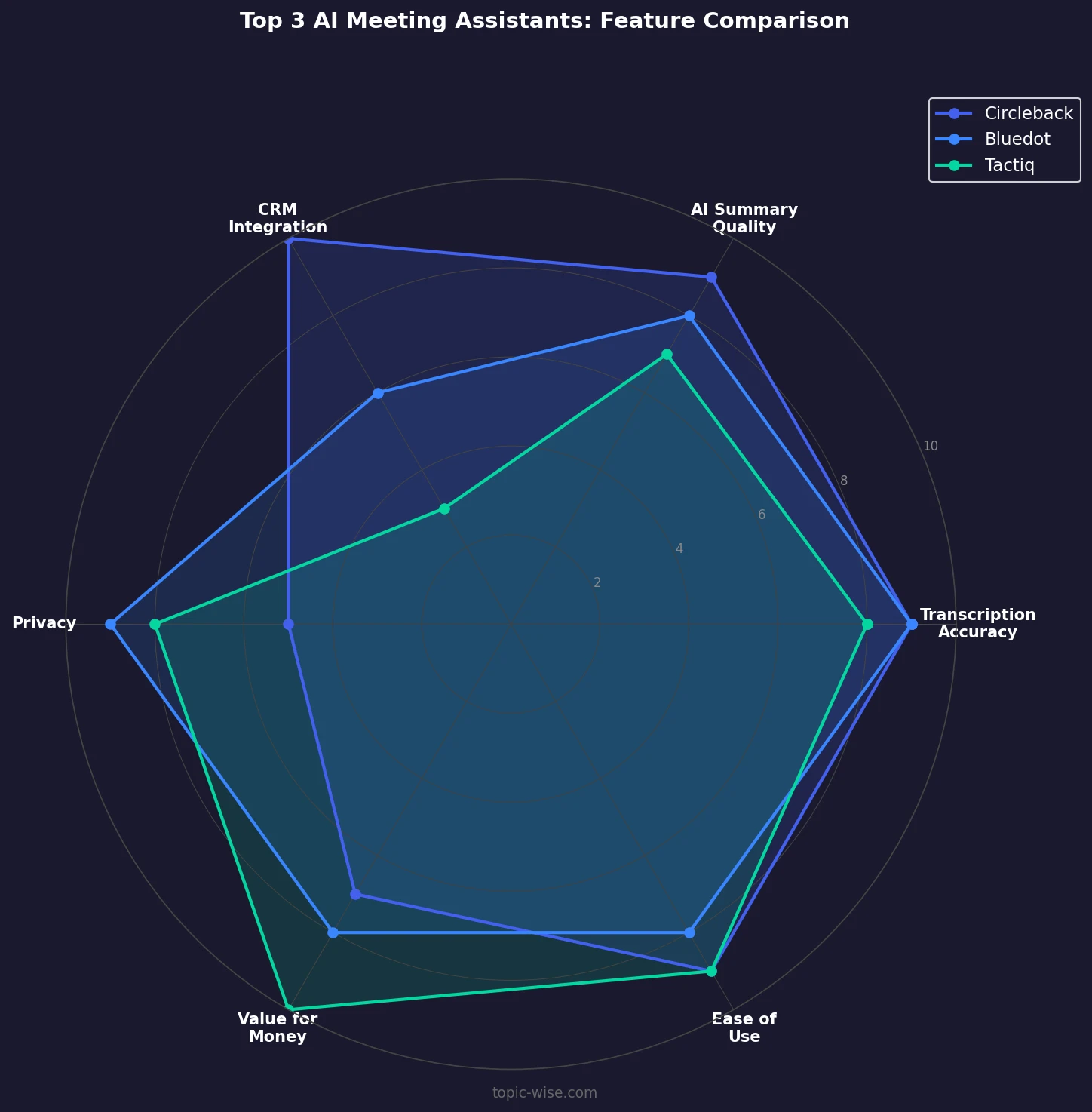
Key Features Deep Dive: What Actually Matters
Understanding which features genuinely improve productivity versus marketing fluff is critical when evaluating AI meeting assistants. Here is our breakdown of the features that delivered real value in testing.
Transcription Accuracy: The Foundation
Every AI meeting assistant claims high transcription accuracy, but our testing revealed meaningful differences:
Best performers (91-93% accuracy):
- Circleback and Fireflies consistently delivered the highest accuracy for standard business English
- Both use custom-trained models optimized for business vocabulary
- Technical terms like API, SQL, and CRM were transcribed correctly
Mid-tier (88-90% accuracy):
- Noota, Bluedot, and Tactiq fell into this range
- Common errors: proper nouns, company names, industry jargon
- All three improved with speaker training features
Lower tier (85-87% accuracy):
- Jamie and Granola scored lower on English-only tests
- Jamie prioritizes multilingual breadth over single-language depth
- Granola relies on local processing, which limits model sophistication
What affects accuracy:
- Audio quality matters more than the tool itself
- Hardwired microphones outperformed laptop mics by 5-7%
- Background noise reduced accuracy by 10-15% across all tools
- Speaker overlap caused the most errors - no tool handled crosstalk well
AI Summary Quality: Beyond Basic Recaps
Transcription is table stakes. Summary quality is where tools differentiate:
Action item extraction varied dramatically:
| Tool | Action Item Accuracy | False Positives |
|---|---|---|
| Circleback | 89% | Low |
| Noota | 85% | Medium |
| Fireflies | 82% | Medium |
| Bluedot | 78% | Low |
| Tactiq | 75% | Medium |
| Granola | 72% | Low |
| Jamie | 70% | High |
Circleback stood out by identifying implicit action items - statements like "we should probably look into that" were correctly flagged, while other tools only caught explicit assignments.
Summary usefulness was subjective but we rated based on:
- Could you skip reading the transcript? (Ideal: yes)
- Were key decisions captured? (Critical for record-keeping)
- Were follow-up items clear? (Essential for accountability)
Circleback and Noota produced summaries that eliminated the need to review transcripts. Tactiq and Jamie summaries often required transcript cross-reference for clarity.
Integration Depth: Where Automation Saves Hours
Native integrations versus Zapier connections matters enormously for reliability:
Native CRM integration quality:
| Tool | HubSpot | Salesforce | Pipedrive | Custom Fields |
|---|---|---|---|---|
| Circleback | Excellent | Excellent | Good | Yes |
| Fireflies | Good | Excellent | Basic | Yes |
| Noota | Good | Good | Good | Yes |
| Bluedot | Basic | Basic | No | Limited |
| Others | Via Zapier only | Via Zapier only | Via Zapier only | No |
What native integration enables:
- Bi-directional sync: CRM updates reflect in meeting notes automatically
- Field mapping: Meeting data populates specific CRM fields
- Automatic contact matching: No manual linking required
- Trigger-based actions: Meeting completion triggers CRM workflows
Zapier limitations we encountered:
- 15-minute delay on free plans
- Occasional sync failures required manual intervention
- Complex workflows hit action limits quickly
- No bi-directional capability
Privacy Features: More Than Marketing Checkboxes
Privacy claims require scrutiny. Here is what each tool actually does:
Data residency options:
| Tool | US Hosting | EU Hosting | Self-Hosted Option |
|---|---|---|---|
| Noota | Yes | Yes | Enterprise only |
| Bluedot | Default US | Yes | No |
| Jamie | No | Default EU | No |
| Granola | Yes | No | No |
| Others | US only | No | No |
Audio storage policies:
- Granola and Tactiq: Never store audio - transcript only
- Bluedot: Stores audio, deleted after 30 days by default
- Circleback: Stores audio, user-configurable retention
- Noota: Stores audio, compliance-grade retention options
- Jamie: Stores audio, EU-compliant deletion
- Fireflies: Stores audio, configurable retention
Recording notification approaches:
- Visible bot tools (Circleback, Fireflies): All participants see the bot
- Browser capture (Tactiq): Uses platform caption - no separate consent
- System capture (Bluedot, Granola, Jamie): Your device records locally - consent is your responsibility
Search and Organization: Finding Information Later
The value of meeting notes diminishes if you cannot find them later:
Search capability comparison:
| Tool | Full-Text | Semantic | Cross-Meeting | Filters |
|---|---|---|---|---|
| Noota | Yes | Yes | Yes | Advanced |
| Fireflies | Yes | Yes | Yes | Good |
| Circleback | Yes | Basic | No | Good |
| Bluedot | Yes | No | No | Basic |
| Tactiq | Yes | No | No | Basic |
| Granola | Yes | No | No | Basic |
| Jamie | Yes | No | No | Basic |
Noota semantic search example: Query: "What concerns did customers raise about pricing?" Results: Returned mentions of "too expensive," "budget constraints," "need to check with finance," and "might be over budget" - none containing the word "pricing."
This semantic capability transforms how teams use meeting intelligence. Instead of remembering exact phrases, you can ask natural questions.
Implementation Guide: Getting Started Right
We have helped dozens of teams adopt AI meeting assistants. Here is what works:
Week 1: Individual Pilot
Day 1-2: Setup
- Install the tool for 1-2 champions
- Connect calendar integration
- Configure notification preferences
- Run a test meeting with internal participants
Day 3-5: Real usage
- Use on actual meetings (start with internal)
- Review transcripts for accuracy baseline
- Test AI summary quality
- Identify integration needs
Day 5-7: Evaluation
- Compare tool output to your notes
- Calculate time saved per meeting
- Identify gaps or concerns
- Decide whether to proceed
Week 2-3: Team Rollout
Prerequisites:
- Legal review of data handling policies
- HR notification if required by policy
- IT approval for any integrations
- Budget approval for paid plans
Rollout steps:
- Announce to team with clear guidelines
- Provide 15-minute training session
- Establish norms for when to record
- Create feedback channel for issues
- Schedule check-in after one week
Common Pitfalls We Have Seen
Pitfall 1: Recording everything
- Not every meeting needs transcription
- Internal casual chats often do not benefit
- Over-recording creates search noise
- Solution: Create guidelines for when to record
Pitfall 2: Ignoring consent
- Different jurisdictions have different rules
- Some clients will object regardless of legality
- Solution: Ask permission explicitly before recording external calls
Pitfall 3: Trusting summaries blindly
- AI summaries miss nuance
- Critical decisions need human review
- Solution: Review summaries for important meetings
Pitfall 4: Not integrating with workflow
- Transcripts sitting in a tool add no value
- Action items need to reach task managers
- Solution: Set up integrations before scaling usage
Industry-Specific Recommendations
Different industries have different requirements. Here are our recommendations:
Sales Teams
Primary recommendation: Circleback
- CRM automation eliminates data entry
- Action item extraction catches follow-ups
- Workflow rules ensure consistent process
Alternative: Fireflies (if Salesforce-centric)
- Deepest Salesforce integration
- Deal intelligence features
- Conversation analytics for coaching
Budget option: Tactiq Free
- Sufficient for individual contributors
- No CRM sync but export-friendly
Consulting Firms
Primary recommendation: Bluedot
- Bot-free preserves client relationships
- Video clips useful for deliverable creation
- Professional appearance matters
Alternative: Granola (for privacy-sensitive clients)
- No audio storage simplifies NDAs
- Notepad UX feels like taking notes
- Less intimidating than recording
Recruiting Teams
Primary recommendation: Noota
- Cross-interview search is invaluable
- Template extraction for scorecards
- Compliance features for candidate data
Alternative: Fireflies (for high volume)
- Established platform, reliable at scale
- Good for coordinating across interviewers
Research Organizations
Primary recommendation: Noota
- Semantic search across all interviews
- Custom templates for research protocols
- Data export for qualitative analysis
Alternative: Tactiq (for budget constraints)
- Free tier supports high volume
- Good export options
- Acceptable accuracy for research
Legal and Healthcare
Primary recommendation: Evaluate carefully
- No tool we tested is HIPAA-certified out of box
- Legal conversations require attorney-client privilege consideration
- Recommendation: Use Noota Enterprise with legal review or avoid AI transcription
Pricing Optimization: Getting the Best Value
Here is how to minimize cost while maximizing utility:
For Individuals
Best free option: Tactiq unlimited
- Zero cost, unlimited meetings
- Acceptable for most individual needs
- Upgrade to Pro only if you need advanced AI prompts
Best paid value: Bluedot Basic at $14/mo
- Bot-free recording worth the premium
- Good enough AI features for most users
- Video on Pro adds significant value for $6/mo more
For Small Teams (2-5 people)
Budget approach: Tactiq Team at $20/user/mo
- Shared workspace for collaboration
- Still cheapest team option
- Sufficient for coordination
Full-featured approach: Circleback Team at $30/user/mo
- CRM automation pays for itself
- Time saved exceeds cost for most sales teams
- Best overall team experience
For Mid-Market (5-20 people)
Balanced approach: Noota Pro at $29/user/mo
- Team intelligence features justify premium
- Cross-meeting search invaluable at scale
- Compliance features reduce risk
Premium approach: Noota Business at $49/user/mo
- Full CRM integration
- API access for custom workflows
- SSO for enterprise security
Negotiation Tips
- Annual plans: Most tools offer 15-20% discount for annual payment
- Competitor pricing: Mention competitor prices - some tools will match
- Volume discounts: Teams of 10+ can often negotiate custom pricing
- Pilot periods: Ask for extended trials before committing
Future of AI Meeting Assistants
The market is evolving rapidly. Here is what we expect:
Near-term (2025-2026)
Commoditization of transcription: Accuracy will converge across all tools. Differentiation will shift entirely to features and integrations.
Agent integration: AI assistants like Claude and ChatGPT will incorporate meeting intelligence. Standalone tools may become features of larger platforms.
Real-time coaching: Tools will provide in-meeting suggestions based on conversation analysis. Early versions exist in Fireflies.
Medium-term (2026-2027)
Voice-first interfaces: Instead of reviewing transcripts, you will ask questions verbally about past meetings.
Predictive features: Tools will anticipate needed follow-ups before you ask, based on conversation patterns.
Cross-platform consolidation: Expect acquisitions. The current market has too many similar players.
What This Means for Buyers
Buy for today, not tomorrow: Do not pay for features you do not need based on future promises.
Avoid long contracts: The market is volatile. Annual plans are fine; multi-year deals are risky.
Export your data: Ensure you can export transcripts and notes. Vendor lock-in is real.
Final Recommendations by Scenario
You Want the Best, Price No Object
Choose Circleback - Best automation, best summaries, best overall experience.
You Have No Budget
Choose Tactiq Free - Genuinely unlimited, genuinely useful.
You Hate Meeting Bots
Choose Bluedot - Invisible recording is the core feature.
You Need Team Analytics
Choose Noota - Cross-meeting intelligence is unmatched.
You Work in Multiple Languages
Choose Jamie - 99+ languages, best code-switching.
You Are Privacy-Paranoid
Choose Granola - No audio storage, local processing, minimal data exposure.
You Live in Salesforce
Choose Fireflies - Deepest integration, most reliable sync.
This guide will be updated quarterly as the market evolves. Last comprehensive review: November 2025.

Written by
John Marti
Testing AI tools so you don't have to. 7+ years covering productivity software, automation, and emerging tech. Previously at TechCrunch and The Verge.
